Verify your email
Hi Johny, to view the full content, please verify your email address by clicking the link sent to youremail@gmail.com
Resend Verification Email
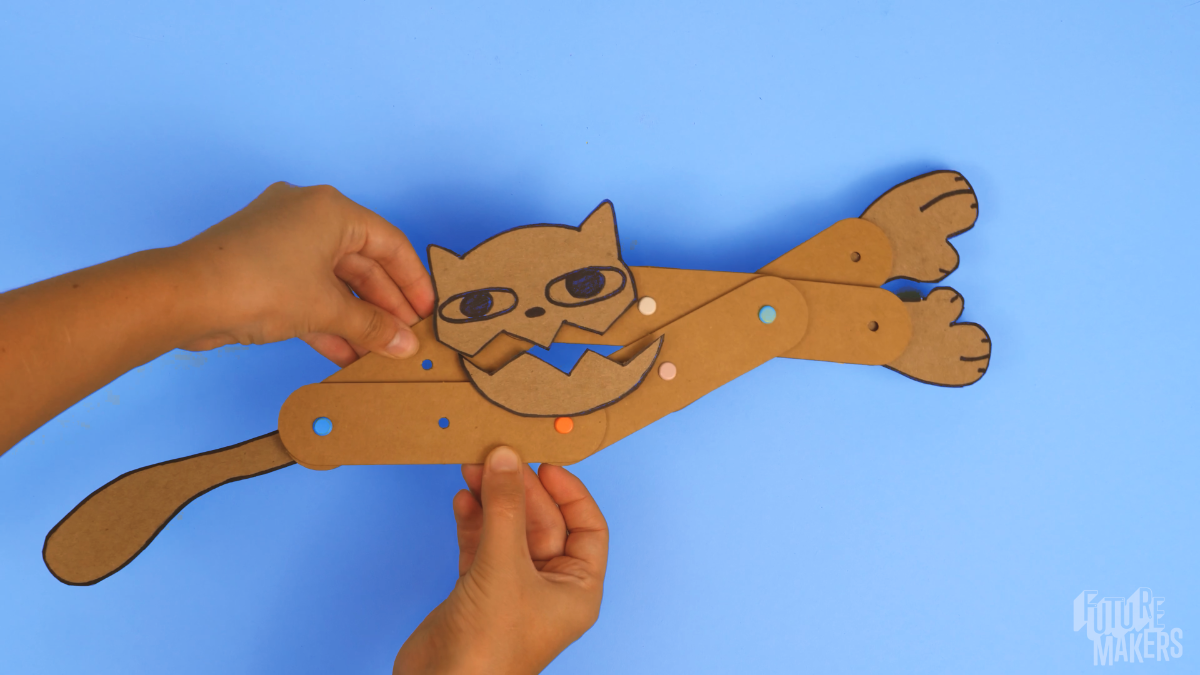
Art Machines are kinetic sculptures that are designed and built to move! They use systems of connected levers and fulcra to come alive. Learners assemble compound machines that extend and retract in unison, then redesign them into unique creatures and inventions. This Spark weaves character creation, engineering, and artistic design into one hands-on challenge where every Art Machine can tell a story.
Get the materials that pair with this educator guide.
Get the materials that pair with this educator guide.
Quick Start gets the main resources in hand. The guide below helps with the decisions that happen before, during, and after students build.
What students build and how the activity works.
Prep questions and pro tips.
Classroom sequence and prompts.
Learning goals and curriculum connections.
Fixes, adaptations, and extensions.
Art Machines are kinetc sculptures that are designed and built to move -and come to life. By assembling levers and fulcra with a custom designed feature, learners explore movement, character development and artistic expression - an engaging entry point to engineering concepts with room for creativity at every step.
Learners follow a core build, then redesign, experiment, and iterate to create a unique solution to a design challenge. Because this is a STEAM challenge, each learner's finished project should look uniquely their own.

Scissors
Drawing materials
Creature Feature design sheets for classroom programs (link below)
Question: What do you notice about the different pieces in your kit? How do you think they will work together?
Question: How can we connect the pieces so they can move?
Question: How does movement transfer from one set of levers to the whole system?
Question: How can we make our Art Machine unique? The example has a face. What will theirs look like?
Question: How do we attach our feature to the machine so it moves?
Question: Now that your Art Machine is working, what could you change to make it do something completely different?
RI.K-2.7 – Use illustrations and words in a text to describe key ideas: Example: Learners refer to visual guides and instructional diagrams to build their Art Machines, identifying how each part contributes to the final design.
SL.K-2.1 – Participate in collaborative conversations: Example: Learners discuss their design choices with peers, describe challenges they encounter, and work together to solve problems.
RI.3-5.7 – Interpret information from diagrams and text: Example: Learners analyze instructional diagrams in the build guide to correctly assemble their Art Machine, then describe the function of each part.
W.3-5.2 – Write informative/explanatory texts: Example: Learners document their design process, explaining why they placed the fulcrum in a certain location and how different lever lengths affected motion.
K.MD.A.1 – Describe measurable attributes of objects: Example: Learners compare the locations of the fulcra and discuss how moving them could affect balance and movement.
K.G.A.1 – Describe objects using names of shapes and their relative positions: Example: Learners describe the X-shape of connected levers and identify the position of the fulcrum relative to the lever ends during assembly.
3.MD.B.4 – Measure and estimate lengths: Example: Learners measure the length of levers and record how small adjustments impact movement efficiency.
4.MD.A.2 – Use measurement to solve problems involving distances: Example: Learners measure distances between fulcrum placements and solve for optimal lever arm lengths to maximize range of motion.
K-PS2-1 – Motion and Stability: Forces and Interactions: Example: Learners explore how pushing and pulling their Art Machines affects movement. When they move the fulcrum closer or farther from the center, they observe how forces change the motion of their machine.
K-2-ETS1-2 – Engineering Design: Example: Learners follow the design process by asking questions, imagining solutions, planning their builds, and iterating to improve their "feature function".
3-5-ETS1-1 – Define a simple design problem with criteria for success and constraints: Example: Learners identify a specific challenge (e.g., making their Art Machine pick up an object) and design an iteration that successfully moves an object from one place to another.
3-5-ETS1-3 – Planning and Carrying Out Investigations: Example: Learners systematically test different fulcrum placements to see how they affect the motion of their Art Machine, documenting their findings and adjusting their builds accordingly.
Lay the machine flat. Press firmly on each fulcrum so it squeezes tight. Try it again and see if it made a difference.
Reinforce with additional sticky strips, or reposition components for better balance. Ask learners: where can we add more adhesive? Encourage them to press firmly to make sure it sticks. If they’ve used all their strips, regular tape works just as well.
Remove the face, extend the machine as long as it stretches, then attach with the mouth closed.
Adjust it! Ask the learner where they can add more adhesive, and encourage them to press firmly to make sure everything is secure.
Its parts might be stuck together. Check that the top and bottom sections aren't connected wth sticky strips ibefore trying again.