Art Machines

What are Art Machines?

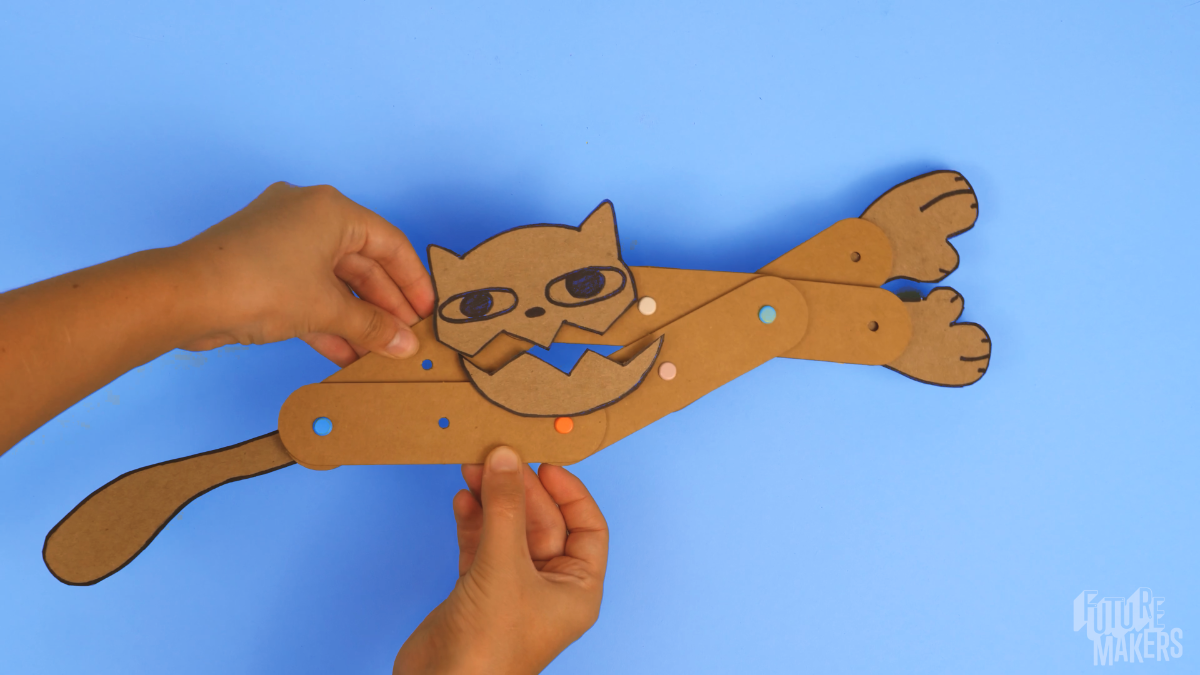
Build, move, and create — Art Machines are kinetic sculptures that use systems of connected levers and fulcra to come alive. Learners assemble compound machines that extend and retract in unison, then redesign them into unique creatures and inventions. This Spark weaves science, engineering, and artistic design into one hands-on challenge where every project looks different.

Time Needed:
30-45 minutes. If used during an event, they can be set up in a 10-minute quick build activity station.
Grade Level:
Designed for learners in Pre-K to 3rd grade, but can be used by all grade levels.
Navigate to
Jump to a section

Overview

Art Machines are hands-on, interactive sculptures designed to move using simple mechanical principles. By assembling levers and fulcra in creative ways, learners explore movement, balance, and artistic expression — an engaging entry point into fundamental engineering concepts with room for creativity at every step.

Learners start by following a core build, then redesign, experiment, and iterate — creating a creature that speaks, an arm that lifts, and a student-designed invention. Because this is a STEAM challenge, each learner's finished project should look uniquely their own.

Key Challenges

  1. Build a compound machine from simple parts. Learners assemble levers and fulcra into a connected system, recognizing how individual components work together to create motion and stability.
  2. Transfer motion through the entire system. Learners explore how adjustments to their design influence how movement travels from one part to another, refining for efficiency and effect.
  3. Apply the engineering design process. Ask / imagine / plan / create / improve — the project encourages iteration, trial and error, and personal exploration at every stage.
  4. Make it their own. This is a STEAM challenge. If all projects resemble the instructional example, prompt learners to experiment further and develop their own creative solutions.

Materials

Each learner recieves
  • A board with die-cut components
  • A package of fulcra (brads)
  • A cardboard rectangle for creating faces or features
  • A set of sticky strips for easy attachment
  • An instruction sheet
What you need to provide

Child-friendly scissors for cutting and modifying components.

Drawing materials such as water-based markers to create the face or features of each creature.

Creature Feature design sheet — a copy for each learner, available on the FutureMakers website.

Tape as a backup adhesive for learners who run out of sticky strips.

Optional resources
  • Tape, scrap cardboard, craft paper, and other classroom art supplies for extensions
  • Extra cardboard or heavy paper for redesign iterations

Learner Goals

MUST
  • Create a system of connected levers and fulcra.
  • Identify the simple machines (lever and fulcra) and explain how they create a compound machine when they work together.
SHOULD
  • Identify how they could create a unique solution to the challenge of designing a mouth, claw, or other creature or machine part.
COULD
  • Collaborate with other learners to create characters and tell stories using their art machines.
  • Work together in a relay game, handing objects to one another using their art machines as extensions of their bodies.

Extension Activities

  • Arts Integration: Transform your Art Machine to create unique characters — anatomical features of different animals and insects (mouths, beaks, claws, wings, tails), or characters from a story you love.
  • Hidden Feature: What is hiding behind those features? Design a secret reveal — is it a tongue, teeth, or another creature lurking inside?
  • Storytelling: Create a short story about your Art Machine’s adventures. What is your Art Machine’s name? What does its voice sound like? Where does it live? Introduce your character to a neighbor and build a story with a main character, a setting, and three events.
  • Double Features: Try redesigning the machine so it can be moved from the middle, with features on both ends — like hands that clap or wings that flap!
  • STEM Exploration: How can you use your Art Machine to tackle a practical engineering challenge, like picking up objects with a modified claw?
  • Claw Machine Relay: Design hands or claws that pick up and hold! Work in pairs to pass a small object using only your Art Machines.
  • SEL Connection: Work together as a group for a relay challenge — handing objects from machine to machine down the line.

Step-by-Step Guide

Pre-Activity Questions
Pre-K - Kindergarten
  1. What do you think will make the Art Machine move?
  2. What shapes do you see in the pieces, and how do you think they will work together?
1st - 3rd Grade
  1. How do you think the levers and fulcra will work together?
  2. What happens when you change where the fulcrum is placed?
  3. How do you think adjusting the length of the levers will change how the Art Machine moves?
Pro Tips
  • Let creativity lead. Encourage learners to add extra elements like arms, tails, or any feature they imagine — the more personal, the better.
  • Coach before you fix. When a learner is struggling, resist the urge to step in. Point out what you see and ask what they think might be causing the challenge. Try: “Ask the group if there’s an expert” who has already solved that problem.
  • Mobilize peer experts. Attaching a face is the hardest step. Invite learners who have successfully attached their components to support others — peer support builds confidence and creativity.
  • Avoid getting hands-on. Only fix a project yourself if it’s truly necessary. Letting learners work through challenges builds ownership and persistence.
  • Use the reclosable bag as a motivator. Remind learners from the start that this project will belong to them when they’re done — and watch how their engagement increases!
  • Keep your demo simple. Add any feature you want to your model machine, but keep it simple so your learners can be more creative than you.
  • Sticky strips are for projects. There’s a lot of fun things to do with the sticky strips (like make mustaches), but they’re really just meant to work like tape on the projects. Encourage learners to use them sparingly.
  • Prep extra cardboard in advance. Cut a few spare rectangles before class. Learners who need a second try on their feature design will stay engaged instead of waiting for materials.

Step 1: Preparing Components

Question: What do you notice about the different pieces in your kit? How do you think they will work together?

  • Remove all pre-cut pieces from the board, including the levers and fulcra.
  • Arrange the pieces neatly to make the process smoother.
  • Discuss what learners think each piece might do before assembling.

Step 2: Assembling the Basic Structure

Question: How can we connect the pieces so they can move?

  • Connect two levers using a fulcrum (brad) to form an “X” shape. The fasteners might be new to your learners — demonstrate by overlapping two holes where you want to put your fulcrum, inserting it, separating the two metal parts, and pressing them flat to connect the levers. Then give it a test.
  • Repeat this process to create three connected “X” shapes.
  • Ensure the levers can pivot smoothly to allow movement.
  • Ask learners how they think changing the placement of the fulcrum might affect movement.

Step 3: Building the Machine

Question: How does movement transfer from one part of the machine to another?

  • Align the three “X” shapes in a row, connecting them at the top and bottom using additional fulcra.
  • Encourage learners to add one set at a time and test as they go.
  • Encourage learners to test how movement changes depending on placement.
  • Have them predict what will happen if they adjust the position of the fulcra.

Step 4: Creating a Creature!

Question: How can we make our Art Machine unique? The example has a face — what will theirs look like?

  • Draw a face on the provided cardboard rectangle. It’s essential to have a design that allows the cardboard to be separated into two pieces — a top and a bottom.
  • Draw the mouth all the way across so it’s easy to create two separate parts, then cut a slit for the mouth to create a moving effect.
  • Add any feature you want, but keep them simple so your learners can be more creative than you.
  • Ask learners if they can create other designs beyond a face.

Step 5: Attaching the Feature

Question: How do we connect our creature to the machine so it moves?

  • Flip your design over so the back is facing upward and align it together.
  • Stretch your machine out and lay one end over the back of your design.
  • Attach the top lever to the top part with a sticky strip — you can tear and use small pieces if you want. Press firmly to make them hold tight.
  • Attach the bottom to the other lever. Now test it!
  • Just in case, have some extra cardboard scraps or heavy paper handy for those who might need another try.

Step 6: Iterate!

Question: Now that your Art Machine is working, what could you change to make it do something completely different?

  • Challenge learners to remove their feature and create something new — a claw, wings, a hidden surprise, or something nobody has thought of yet.
  • What happens if you move the machine from the middle instead of the ends?
  • Can two Art Machines work together to pass an object from one to another?
  • Learners can re-use their levers and fulcra — provide additional cardboard or heavy paper for new designs.
  • See Extension Activities for more structured challenges across grade levels.
Post-Activity Questions
Pre-K - Kindergarten
  1. What part of your Art Machine moved the most? Why?
  2. How did it feel to build and test your machine?
1st - 3rd Grade
  1. How did changing the placement of the fulcrum affect movement?
  2. What was the biggest challenge you faced, and how did you solve it?
  3. If you could redesign your Art Machine, what would you change to make it move differently?

Standards & Goals

Common Core ELA Standards

RI.K-2.7 – Use illustrations and words in a text to describe key ideas: Example: Learners refer to visual guides and instructional diagrams to build their Art Machines, identifying how each part contributes to the final design.

SL.K-2.1 – Participate in collaborative conversations: Example: Learners discuss their design choices with peers, describe challenges they encounter, and work together to solve problems.

RI.3.7 – Interpret information from diagrams and text: Example: Learners analyze instructional diagrams in the build guide to correctly assemble their Art Machine, then describe the function of each part.

W.3-5.2 – Write informative/explanatory texts: Example: Learners document their design process, explaining why they placed the fulcrum in a certain location and how different lever lengths affected motion.

RST.6-8.7 – Analyze diagrams and scientific texts: Example: Learners compare their designs to instructional diagrams, troubleshooting issues based on written instructions and experimental observations.

W.6-8.1 – Write arguments to support claims with evidence: Example: Learners write a report explaining which fulcrum placement was most effective for movement, providing evidence from their experimentation.

Common Core Math Standards

K.MD.A.1 – Describe measurable attributes of objects: Example: Learners compare different lever lengths and discuss how moving the fulcrum affects balance and movement.

K.G.A.1 – Describe objects using names of shapes and their relative positions: Example: Learners describe the X-shape of connected levers and identify the position of the fulcrum relative to the lever ends during assembly.

3.MD.B.4 – Measure and estimate lengths: Example: Learners measure the length of levers and record how small adjustments impact movement efficiency.

4.MD.A.2 – Use measurement to solve problems involving distances: Example: Learners measure distances between fulcrum placements and solve for optimal lever arm lengths to maximize range of motion.

6.RP.A.3 – Use ratio reasoning to solve problems: Example: Learners experiment with different lever-to-fulcrum ratios and analyze how changing these ratios impacts the efficiency of motion.

7.G.A.2 – Solve real-world problems involving geometry: Example: Learners use geometric principles to optimize lever placement, applying proportional reasoning to ensure even force distribution.

Next Generation Science Standards (NGSS)

K-PS2-1 – Motion and Stability: Forces and Interactions: Example: Learners explore how pushing and pulling their Art Machines affects movement. When they move the fulcrum closer or farther from the center, they observe how forces change the motion of their machine.

K-2-ETS1-2 – Engineering Design: Example: Learners follow the design process by asking questions about how levers work, imagining solutions, planning their builds, and iterating to improve movement.

3-PS2-4 – Defining and Delimiting Engineering Problems: Example: Learners identify a specific challenge (e.g., making their Art Machine pick up an object) and design an iteration that successfully moves an object from one place to another.

3-5-ETS1-3 – Planning and Carrying Out Investigations: Example: Learners systematically test different fulcrum placements to see how they affect the motion of their Art Machine, documenting their findings and adjusting their builds accordingly.

MS-PS3-5 – Energy Transfer: Example: Learners analyze how stored energy in their Art Machine (when the lever is pushed down) is converted into motion energy when the force is released.

MS-ETS1-2 – Engineering Design: Example: Learners apply an iterative design process to optimize the motion of their Art Machines, making calculated changes to lever lengths and fulcrum positions to enhance efficiency.

Troubleshooting & Pro Tips

Levers Come Apart

Lay the machine flat. Press firmly on each fulcrum so it squeezes tight. Try it again and see if it made a difference.

Face Is Loose

Reinforce with additional sticky strips, or reposition components for better balance. Ask learners: where can we add more adhesive? Encourage them to press firmly to make sure it sticks. If they’ve used all their strips, regular tape works just as well.

Mouth Doesn’t Open Wide

Remove the face, extend the machine as long as it stretches, then attach with the mouth closed.

Feature Is Floppy

Adjust it! Ask the learner where they can add more adhesive, and encourage them to press firmly to make sure everything is secure.

Machine Isn’t Moving

Its parts might be stuck together. Check that the top and bottom sections are fully separated before trying again.

Book a quick support session via Calendly
Book here