Verify your email
Hi Johny, to view the full content, please verify your email address by clicking the link sent to youremail@gmail.com
Resend Verification Email
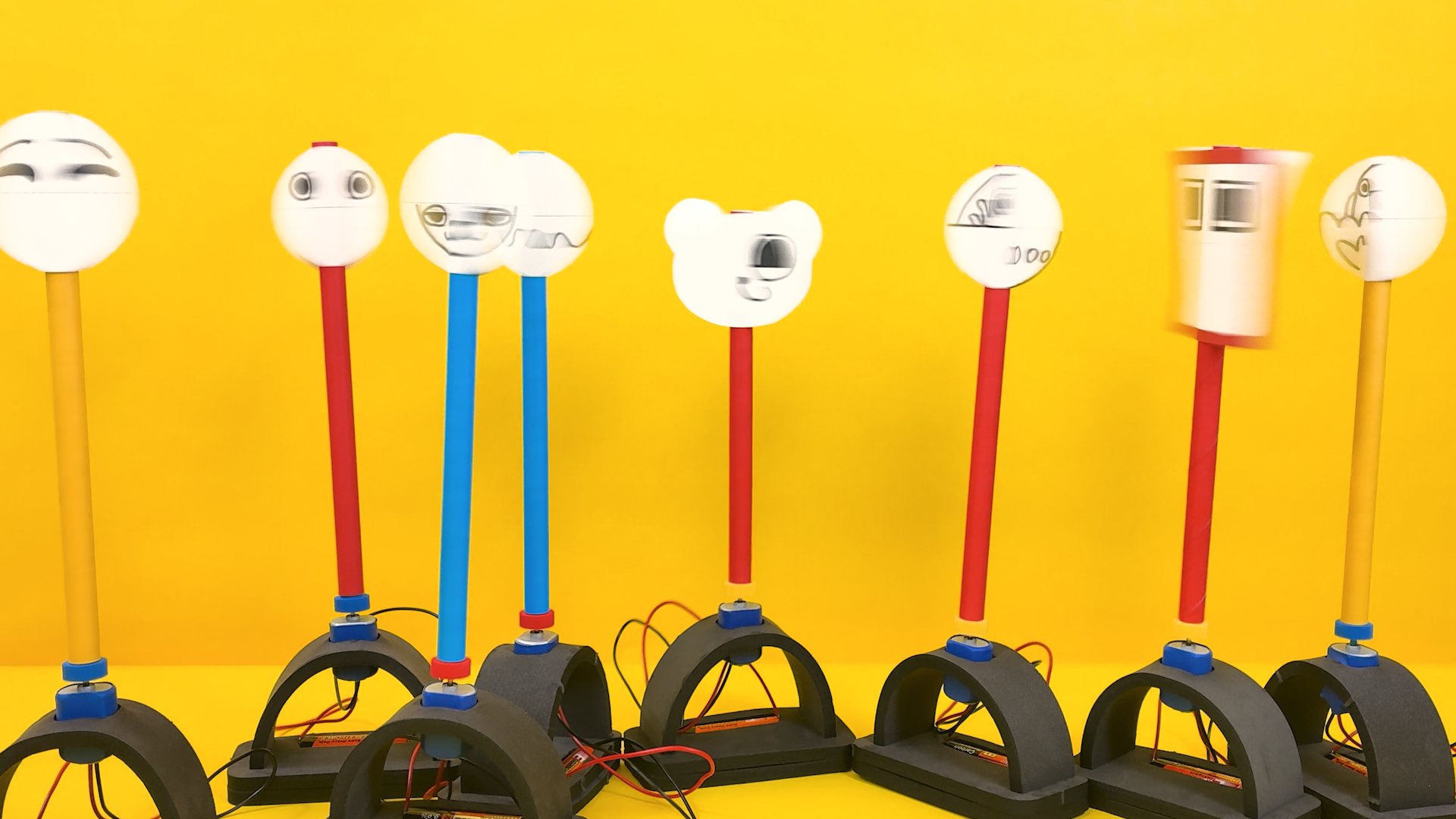
Build a motorized thaumatrope - a spinning disc that merges two drawings into one optical illusion. Learners design image pairs, assemble a battery-powered spinner, and discover firsthand how their brain can be tricked into seeing something that isn’t actually there.
Get the materials that pair with this educator guide.
Get the materials that pair with this educator guide.
Quick Start gets the main resources in hand. The guide below helps with the decisions that happen before, during, and after students build.
What students build and how the activity works.
Prep questions and pro tips.
Classroom sequence and prompts.
Learning goals and curriculum connections.
Fixes, adaptations, and extensions.
Eyelusions delivers a complete motorized thaumatrope that learners assemble and design from scratch. Using foam components, a DC motor, and an AA battery, they build a working spinner, then draw split images across two stickers - choosing their own challenge level from the “spice scale”: top-and-bottom (mild), left-and-right (medium), or opposite-corners (spiciest). When the tube spins and the wires touch the battery, two pictures become one.
The build moves through nine steps: exploring kit components, assembling the foam base, installing the motor, testing the circuit, planning a design on the practice sheet, drawing on stickers, attaching stickers to the tube, connecting the tube to the motor, and spinning to see the illusion come to life - with an Iterate step inviting new designs. A printable practice/design sheet lets learners experiment freely with image-splitting ideas before committing to stickers, making mistakes a built-in part of the process.
Once their first illusion works, learners have two more sets of stickers ready to go - plus the option to use sticky notes or cut-out practice-sheet drawings for even bigger, more inventive illusions. A standout extension is the collaborative challenge: one learner draws the top half of an image while a partner draws the bottom half without seeing each other’s work, producing results that are often hilarious and always unique.

Educators must provide: pencils (strongly encouraged for the planning and design steps), markers or crayons (water-based markers recommended - darker images are more visible when spinning), and scissors (needed for trimming a mushed tube end and for cutting practice-sheet drawings into extended-design pieces).
Question: What’s in your kit, and what do you think each piece does?
Question: How do the foam pieces fit together to hold the battery in place?
Question: How does the foam hold the motor without any glue or screws?
Question: What makes the motor spin - and does it matter which wire touches which end?
Question: How do you split one image into two pieces that will blend back together when spinning?
Question: How do you get your planned image from the practice sheet onto your stickers?
Question: Does it matter where on the tube each sticker goes?
Question: What happens when the two images start moving faster than your eyes can follow?
Question: Now that you know how it works, what would you do differently - or what new illusion can you create?
RI.K-2.7 – Use illustrations and details to describe key ideas: Learners use the practice sheet and spice scale illustrations to plan their image pairs, connecting visual diagrams of the three splitting strategies (top/bottom, left/right, opposite corners) to the concept of how two halves combine into a single blended picture.
SL.K-2.1 – Participate in collaborative conversations: Learners discuss their sticker design choices with peers during the planning and iteration stages, sharing which spice-scale technique they chose and why, and asking for help from classmates who have a working illusion when their own design doesn’t blend correctly.
RI.3-5.3 – Explain relationships between events or concepts: Learners explain the cause-and-effect relationship between spinning speed and image blending, articulating how the motor’s rotational rate determines whether the brain perceives two separate sticker drawings or one fused optical illusion.
W.3-5.2 – Write informative/explanatory texts to examine a topic and convey ideas clearly: Learners explain how the thaumatrope connects to modern animation and film, writing a short explanatory piece that traces the idea from early optical toys through cartoons to movies, using the “wonder turner” etymology and their own spinning results to explain how persistence of vision made moving pictures possible.
RST.6-8.3 – Follow precisely a multistep procedure: Learners execute the nine-step build sequence - from stacking and slotting foam bases through motor installation, wire testing, sticker alignment, and tube attachment - applying precise procedural reading to ensure the connector sits straight and sticker orientation is maintained on both sides of the tube.
SL.6-8.1 – Engage in collaborative discussion: Learners evaluate competing design technique choices with peers, discussing the tradeoffs between mild (top/bottom), medium (left/right), and spiciest (opposite corners) splitting strategies, and citing evidence from their own spinning results to support which approach produced the clearest illusion.
K.G.A.1 – Describe positions and shapes in the environment: Learners identify and describe the circular sticker shape and the relative positions of image halves - above/below the horizontal guideline, left/right of the vertical guideline, or in opposite corners - as they plan their designs on the practice sheet using spatial vocabulary.
K.MD.A.1 – Describe measurable attributes of objects: Example: Learners describe measurable attributes of their paper tube and foam base - length and weight - comparing whose tube feels longer or heavier before mounting it on the motor, and predicting whether a heavier tube will spin as easily as a lighter one.
3.G.A.1 – Understand that shapes in different categories may share attributes: Learners analyze the circular sticker as a geometric shape divided by horizontal, vertical, and diagonal guidelines - partitioning the circle into two equal regions and comparing how each splitting strategy (top/bottom, left/right, opposite corners) creates symmetrical halves that serve as mirror-image designs when the thaumatrope spins.
4.G.A.3 – Recognize a line of symmetry for a two-dimensional figure: Example: Learners identify the line of symmetry each splitting strategy draws across the circular sticker - a horizontal fold line for top/bottom, a vertical fold line for left/right, a diagonal fold line for opposite corners - checking that folding the sticker along their chosen guideline lines up the two halves before they commit to drawing.
7.G.A.1 – Solve problems involving scale drawings of geometric figures: Example: Learners reproduce their sticker design at a different scale in the Sticky Note Supersized extension, transferring the same image pair from the small circular sticker onto a larger sticky note while keeping the proportions of their drawing the same, then troubleshooting the new alignment challenges a bigger scale creates.
7.G.B.4 – Know the formulas for the area and circumference of a circle and use them to solve problems: Learners measure the radius of the circular sticker and use πr² to find its area, then work out how much area each half-image occupies under the three splitting strategies - halves for the top/bottom and left/right splits, diagonal quadrant pairs for the spiciest technique - and use 2πr to compare how far a point on the rim travels in a single rotation.
K-PS2-1 – Plan and conduct an investigation to compare forces: Example: Learners compare a gentle push against a firm push when seating the paper tube onto the motor’s connector cap, discovering that a gentle push leaves the tube loose and wobbling off-center while a firm push seats it straight - directly investigating how a stronger push changes whether the tube spins smoothly or wobbles.
K-2-ETS1-2 – Develop a simple sketch or model to illustrate a solution: Learners use the practice sheet to sketch and refine image pair designs before committing to stickers, treating the planning sheet as an iterative model where mistakes are welcome and multiple approaches (mild, medium, spiciest) can be tested before selecting a final design to transfer.
3-PS2-1 – Investigate the effects of balanced and unbalanced forces on motion: Learners observe how the centered versus off-center placement of the paper tube on the motor connector affects rotational motion, discovering that a misaligned tube causes the entire base to vibrate and wobble across the table, directly demonstrating how unbalanced forces disrupt steady rotation.
3-5-ETS1-3 – Plan and carry out fair tests to identify failure points: Learners iterate through multiple sticker design attempts using the three spice-scale splitting techniques, testing each design by spinning and observing whether the illusion blends correctly, identifying which approach worked and why - and using sticky notes or cut practice sheet drawings when stickers run out to extend their testing.
MS-LS1-8 – Gather and synthesize information that sensory receptors respond to stimuli by sending messages to the brain: Learners investigate how the visual system’s sensory receptors transmit signals to the brain faster than the brain can resolve two distinct images when the thaumatrope spins, modeling the phi phenomenon as the brain’s integration of rapidly alternating visual stimuli into a single perceived image - directly connecting the retina’s response to spinning stimuli to the neural processing that produces the optical illusion.
MS-ETS1-2 – Evaluate competing design solutions using criteria and constraints: Learners compare the three sticker splitting strategies on the spice scale, evaluating each against the criteria of image clarity and the constraint of the circular sticker boundary, using evidence from spinning results to determine which technique (top/bottom, left/right, or opposite corners) best meets the goal of producing a convincing blended illusion.
The metal ends of the motor wires can bend, making it hard to insert them alongside the battery. If this happens, lift the battery up slightly, hold the wire in position against the terminal, and press both the wire and battery down into the foam together.
A small amount of wobble is normal and learners often enjoy watching their machine slowly wiggle across the table. If the vibration is severe, check that the tube is seated straight on the motor connector. Press the connector fully down until it sits secure and centered.
If the end of the paper tube is bent or crushed, it won’t sit squarely on the motor connector. Trim the end straight with scissors to restore a clean, flat edge before reattaching.
If the plastic connector cap comes loose from the motor shaft, place a tiny piece of tape on the motor shaft first, then press the cap back on firmly. The tape adds friction and holds the cap in place during spinning.
If the wires are touching the correct battery terminals but the motor isn’t running, check whether the motor has shifted out of its holder. The foam strip grips the motor body - if the motor has slid, reseat it so it fits snugly, then retest.