Flying Machines

What are Flying Machines?

Invent a wind-up flying machine that transforms stored energy into flight! Learners design and attach a custom fuselage, wind the rubber band to store elastic potential energy, and master the Lift-Off launch technique to send their creation soaring. Along the way, they explore aerodynamics, symmetry, and the engineering design process through iterative wing modifications.

Time Needed:
15 minutes at an event activity station, 30-40 minutes for a classroom session, up to 60 minutes with extensions.
Grade Level:
Designed for learners in Kindergarten and up, but can be used by all grade levels.
Navigate to
Jump to a section

Overview

Flying Machines challenge learners in grades K and up to build a rubber band-powered flying machine from a propeller, fuselage stick, and custom-designed wings. As they wind the propeller and practice the two-step Lift-Off release technique, learners experience the transfer of elastic potential energy to kinetic energy firsthand. The activity takes as little as 10 minutes at an activity station or extends to 60 minutes with wing iteration challenges.

What makes Flying Machines unique is the emphasis on iterative design and resilience. After a basic flight test without wings, learners draw, cut, and attach symmetrical fuselage designs, then test how each modification affects flight distance, direction, and duration. The engineering design process comes alive as learners adjust wing shapes, sizes, and rubber band tension, building persistence and critical thinking through repeated launches and refinements.

Key Challenges

  1. Mastering the Lift-Off technique. Learners must release the propeller first to let it generate lift before releasing the fuselage. Releasing both at once causes the machine to twist and fall.
  2. Storing enough elastic potential energy. The rubber band must be wound at least 50 times (clockwise) to generate enough energy for flight. Learners need to see visible bumps in the rubber band before launching.
  3. Designing a symmetrical fuselage. Wings must be balanced along a centerline to fly smoothly. Asymmetrical designs cause the machine to veer or spin unpredictably.
  4. Iterating on wing designs for better flight. Learners use the engineering design process to test different wing shapes, sizes, and attachments, analyzing how each change affects flight performance.

Materials

Each learner recieves
  • Propeller (7-inch plastic)
  • Fuselage stick (wooden base with hook)
  • Latex-free rubber band
  • Card stock instruction and fuselage design sheet (doubles as wing templates)
  • Marker set
  • Sticky strips (for attaching wings to fuselage)
What you need to provide

Scissors for cutting out fuselage and wing designs from the card stock template.

Additional scrap or construction paper for learners who want to create alternate wing designs beyond the included template.

Projector and screen for displaying the Flying Machines presentation slides that guide learners through the build.

Drawing materials additional markers or colored pencils for fuselage decoration (optional but encouraged).

Optional resources
  • Masking tape or painter's tape for reattaching wings during iteration without damaging the fuselage
  • Extra card stock for additional wing design experiments
  • Rulers for measuring wing dimensions and testing symmetry
  • Open indoor space or hallway for safe test flights
  • Flying Machines Extension document and wing evolution worksheet for guided iteration

Learner Goals

MUST
  • Assemble a flying machine by connecting the propeller, fuselage stick, and rubber band.
  • Store elastic potential energy by winding the propeller clockwise at least 50 times.
  • Successfully launch the flying machine using the two-step Lift-Off technique (release propeller first, then fuselage).
SHOULD
  • Design and cut a symmetrical wing from the card stock template and attach it to the fuselage.
  • Test flight performance with and without a wing, observing how the fuselage affects aerodynamics.
  • Explain the difference between elastic potential energy (stored in the wound rubber band) and kinetic energy (released when the propeller spins).
COULD
  • Create multiple wing designs and use the engineering design process to iterate — testing, analyzing, and improving each version.
  • Experiment with variables such as wing shape, size, number of rubber band twists, and wing tip modifications to optimize flight.
  • Document observations on the wing evolution worksheet and share pro tips with peers based on their findings.

Extension Activities

  • Wing Design Challenge: Provide additional paper or cardstock and masking tape. Have learners design, cut, and attach new wing shapes to their existing fuselage. Test each design and record which flies best using the Wing Evolution Worksheet.
  • Size vs. Weight Experiment: Challenge learners to test how wing size affects flight. Bigger wings create more lift but also add weight. Have them predict outcomes before testing and compare results.
  • Engineering Design Iteration: Use the Flying Machines Extension document to guide older students through a structured iterative design process. Add constraints such as weight limits or target distances to deepen the engineering challenge.
  • Flight Distance Competition: Mark a launch line and have learners compete to see whose flying machine travels the farthest. After each round, give teams time to modify their designs and retest, reinforcing the iterative cycle.
  • Peer Review and Feedback: Have learners present their designs to a partner, explain their choices, and offer each other one suggestion for improvement. Rebuild and retest based on peer feedback.

Step-by-Step Guide

Pre-Activity Questions
K - 1st Grade
  1. Have you ever watched a bird fly? What do you think helps it stay in the air?
  2. What happens when you wind up a toy really tight and let it go?
  3. Can you show me what "clockwise" means with your finger?
2nd - 3rd Grade
  1. What is the difference between potential energy and kinetic energy? Can you think of an example of each?
  2. Why do you think airplanes have wings? What would happen if the wings were a different shape or size?
  3. What does "symmetrical" mean, and why might symmetry matter when building something that flies?
Pro Tips
  • Wind It Up — A Lot. Learners need to twist the propeller clockwise at least 50–70 times until they can see big bumps in the rubber band. More twists means more stored potential energy and better flights. If a machine barely lifts off, the answer is almost always "wind it more."
  • Use the Lift-Off Technique. Don't let go of everything at once. Release the propeller first, let it spin and generate lift, then release the fuselage. Practicing this timing is the single biggest factor in successful flights.
  • Clockwise Means Up. If the flying machine shoots downward, the propeller was wound counterclockwise. You may need to review the difference between clockwise and counterclockwise with younger learners before they start winding.
  • Make Sure the Propeller Spins Freely. If the rubber band is pinched, taped over, or stuck against the fuselage, the propeller can't spin fast enough to generate lift. Check that nothing is blocking its rotation before each launch.
  • Symmetry Helps — But Isn't Essential. Encourage learners to use their whole sheet of paper and experiment with different wing shapes and sizes. Bigger wings add weight, so testing multiple designs is part of the learning.
  • Let Learners Own Their Designs. Encourage coloring, unique wing shapes, and personal touches. Ownership drives engagement and willingness to take risks during iteration. Offer support without leading.

Step 1: Review Your Materials

Question: How could you combine these parts to assemble a unique Flying Machine?

  • Have learners lay out all components: one fuselage stick (the base), a 7-inch plastic propeller, a rubber band, sticker strips, a marker set, and the instruction sheet with two fuselage design sections.
  • Ask learners to predict what each piece might do before building. The instruction sheet doubles as their fuselage — they will cut wing shapes from it later.
  • You will also need scissors, which are not included in the kit.

Step 2: Build the Base

Question: What do you notice about the hooks on the propeller and the fuselage stick? Why do you think they are shaped that way?

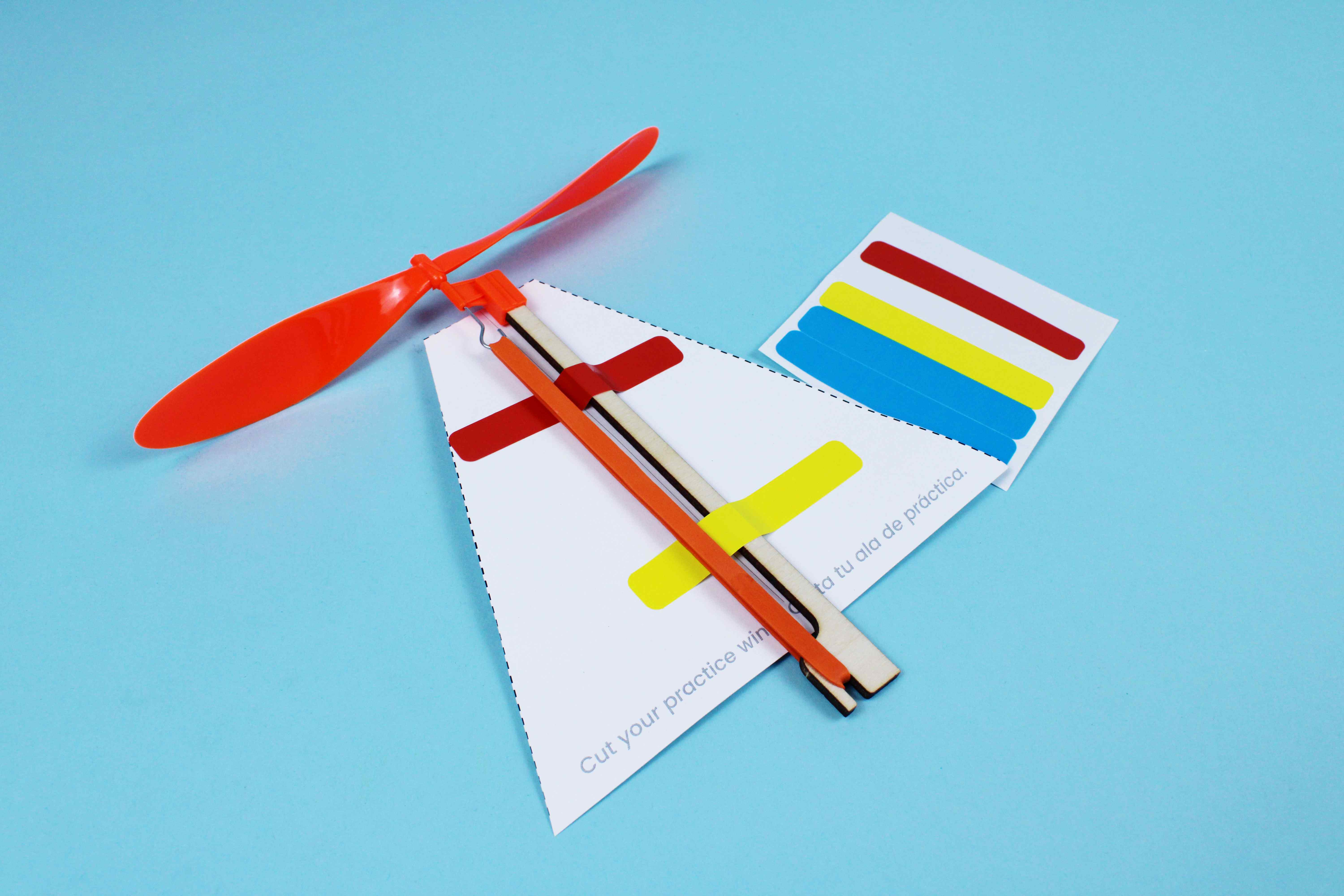
  • Have learners attach the propeller onto one end of the fuselage stick. Push it in all the way and test to make sure it is attached firmly.
  • Point out that the metal hook on the propeller and the wooden hook on the opposite end of the stick need to face each other — the rubber band will stretch between them.
  • Stretch the rubber band between two fingers and hook it onto both the propeller hook and the wooden hook on the other end of the fuselage stick.

Step 3: Store Energy

Question: What do you think is happening to the rubber band as you wind the propeller? Where is the energy going?

  • Hold the fuselage stick firmly and turn the propeller clockwise (to the right) at least 50 times to tighten the rubber band. More is better — 70 to 100 twists will store significantly more energy.
  • Ask learners to look for big bumps forming in the rubber band. These bumps are visible evidence of stored elastic potential energy.
  • Explain that when they release the propeller, the rubber band will release what it has stored, converting potential energy into kinetic energy that spins the propeller.
  • Pro Tip: You may need to review the difference between clockwise and counterclockwise. Clockwise is the direction a clock's hands turn — to the right. Winding counterclockwise will cause the machine to fly downward instead of up.

Step 4: Test Without Wings

Question: Will the Flying Machine fly without any wings attached? What do you predict will happen?

  • Introduce the LIFT-OFF technique. This is a two-step release: first release the propeller so it starts to spin and generate lift (LIFT), then release the fuselage stick (OFF) — and it will lift off!
  • If learners release both the stick and propeller at the same time, the propeller will not have enough time to generate lift, and the machine will twist in opposite directions and fall. Emphasize the pause between LIFT and OFF.
  • If the machine flies downward instead of up, the propeller was wound in the wrong direction. Have learners rewind clockwise.
  • Ensure the rubber band is wound tightly enough — look for those big bumps. Learners can always add more energy by winding more.

Step 5: Cut and Color Test Fuselage

Question: How do you think adding wings will change the way the Flying Machine flies?

  • Direct learners to the test shape on the left side of the instruction sheet. Encourage them to color it in any way they like using markers.
  • Have learners cut along the dotted lines carefully. Remind them to save the rest of the paper — they will use the design template on the right side later for their custom wings.
  • Discuss symmetry: the test fuselage is a mirror image along its center line. Ask learners why they think symmetry might matter for flight.

Step 6: Attach Your Fuselage

Question: Where on the fuselage stick should you place the wing? Why does placement matter?

  • Have learners attach the cut-out wing to the wooden fuselage stick using the sticky strips. Align the stick along the center of the wing.
  • Critical reminder: do not cover the rubber band with sticky strips. The rubber band needs to move freely to release its stored energy. Only stick to the wooden fuselage stick itself.
  • Make sure the propeller can still spin without hitting the wing. Adjust placement if needed.

Step 7: Test With Fuselage

Question: How did adding the wing change the flight compared to your test without wings?

  • Wind the propeller clockwise at least 50 times again, looking for big bumps in the rubber band.
  • Use the same LIFT-OFF technique: release the propeller first to generate lift, then release the fuselage stick.
  • Have learners test in a safe, open area. Ask them to observe and describe what is different — does it fly higher, farther, or in a different direction than the wingless version?
  • Encourage peer observation: learners can watch each other's flights and share what they notice.

Step 8: Design Your Own Wings

Question: What wing shape do you think will make your Flying Machine fly the farthest? The highest? Can you make it turn?

  • Now learners use the design template on the right side of the instruction sheet to draw their own unique wing profile. There are light dashed lines printed on the template to guide symmetry, but symmetry is helpful — not essential!
  • Encourage learners to use the whole sheet. Their design should look different from anyone else's. Show wing inspiration examples if available.
  • Pro Tip: Learners can bend one or both sides of their fuselage to cause the machine to arc or twist in flight. They can also experiment with changing the tips of their wings to see what effect it produces.
  • Have learners cut out their custom wing, attach it with sticky strips (avoiding the rubber band), and test using the LIFT-OFF technique.

Step 9: Iterate!

Question: What would you change to make your Flying Machine fly farther, fly longer, or turn left or right?

  • Encourage learners to tweak wing shapes, sizes, and the number of rubber band twists to observe different flight outcomes.
  • Prompt experimentation: What happens if you make the wings larger? What if you use a completely different shape? Can you make it fly in a curve?
  • Have learners disassemble and rebuild using new designs. They can combine ideas from multiple attempts or borrow inspiration from classmates.
  • Use the Flying Machines Extension document and its printable wing evolution worksheet to support structured testing and iteration.
  • Remind learners that iterative testing and peer feedback are how real engineers improve their designs. Every test teaches something new.
Post-Activity Questions
K - 1st Grade
  1. What happened when you let go of the propeller? Where did your flying machine go?
  2. What was the hardest part of building your flying machine? How did you figure it out?
  3. If you could change one thing about your flying machine, what would it be?
2nd - 3rd Grade
  1. What is the difference between potential energy and kinetic energy? Where did you see each one in your flying machine?
  2. What challenges did you encounter, and how did you solve them? What pro tips would you offer to other learners?
  3. How could you modify your flying machine to fly longer, farther, or higher? What would you test first?
  4. How does this project connect to something you have experienced or seen before?

Standards & Goals

Common Core ELA Standards

RI.K-2.7 – Use illustrations and words in a text to describe key ideas: Example: Learners review the instructional diagrams on their cardstock sheet and identify how each labeled part — propeller, fuselage stick, rubber band — contributes to flight, describing the function of each component in their own words.

SL.K-2.1 – Participate in collaborative conversations: Example: Learners discuss their wing design choices with peers after each test flight, describing what happened when they changed wing shape or size and listening to classmates' observations about their own Flying Machines.

RI.3-5.7 – Interpret information from diagrams and text: Example: Learners analyze the energy transfer diagram showing elastic potential energy converting to kinetic energy, then explain in their own words why winding the rubber band clockwise stores energy that the propeller releases as motion.

W.3-5.2 – Write informative/explanatory texts: Example: Learners document their wing evolution process on the worksheet, explaining why each successive wing design performed differently and how changes in symmetry, shape, or size affected flight distance.

RST.6-8.7 – Analyze diagrams and scientific texts: Example: Learners create annotated diagrams of the energy transfer process in their Flying Machine, labeling where elastic potential energy is stored in the wound rubber band and where kinetic energy is released through the spinning propeller.

W.6-8.1 – Write arguments to support claims with evidence: Example: Learners write a brief analysis arguing which wing design achieved optimal flight, citing measured distances, number of rubber band twists, and wing dimensions from their wing evolution worksheet as evidence.

Common Core Math Standards

K-2.MD.A – Describe and compare measurable attributes: Example: Learners measure the length and width of their cardstock wings using rulers, comparing dimensions across iterations to understand how larger or smaller wings affect flight distance and stability.

K-2.G.A – Identify and describe shapes: Example: Learners identify geometric shapes in their wing designs — triangles, rectangles, and curves — and describe how the symmetry of their fuselage shape helps the Flying Machine fly straighter.

3-5.MD.B – Measure and estimate lengths and represent data: Example: Learners measure wing dimensions across four iterations on the wing evolution worksheet, recording length and width data to identify which measurements produced the longest flights.

3-5.G.A – Reason with shapes and their attributes: Example: Learners apply geometric reasoning to optimize wing aerodynamics, exploring how triangular, rectangular, and organic wing shapes create different flight paths and determining which symmetrical designs achieve the most stable flight.

6-8.RP.A – Understand ratio concepts and use ratio reasoning: Example: Learners experiment with the ratio of rubber band twists to flight distance, testing increments of 25, 50, 75, and 100 twists and analyzing how the relationship between stored energy and flight performance is not strictly linear.

6-8.G.A – Solve real-world problems involving geometry: Example: Learners use geometric principles to calculate wing area and assess its effect on lift, comparing flight results from symmetrical versus asymmetrical wing designs and applying proportional reasoning to optimize fuselage balance.

Next Generation Science Standards (NGSS)

K-PS3-1: Energy and Motion: Example: Learners explore how winding the rubber band clockwise stores elastic potential energy that converts to kinetic energy when the propeller is released, observing how more twists produce faster spinning and longer flights.

K-2-ETS1-2: Engineering Design: Example: Learners follow the design process by building, testing, and improving their Flying Machine, starting with a bare fuselage flight, then adding a test wing, and finally designing a custom wing shape to improve performance.

3-PS2-1: Forces and Interactions: Example: Learners investigate how wing shape and size affect the forces acting on their Flying Machine, testing whether bending wing tips changes the flight path from straight to curved, and observing how symmetry affects stability.

3-5-ETS1-3: Planning and Carrying Out Investigations: Example: Learners systematically test different wing designs using the wing evolution worksheet, changing one variable at a time — shape, size, or symmetry — documenting flight results across four iterations to identify the most effective design.

MS-PS3-5: Conservation of Energy and Energy Transfer: Example: Learners analyze the complete energy transfer chain in their Flying Machine — from mechanical work winding the rubber band, to elastic potential energy stored in the twisted band, to kinetic energy released through the spinning propeller — and explain why energy is conserved but changes form at each stage.

MS-ETS1-2: Developing Possible Solutions: Example: Learners apply an iterative design process to optimize flight by systematically varying wing geometry, rubber band tension, and launch technique, evaluating each solution against criteria of distance, height, and stability before selecting their best design.

Troubleshooting & Pro Tips

Flying Machine Won't Fly or Barely Lifts Off

The most common cause is not enough stored energy. Have learners wind the propeller clockwise at least 50–70 times — they should see big bumps forming in the rubber band. You can always add more twists. If it still won't fly, check that the rubber band is not pinched or stuck against the fuselage.

Flying Machine Shoots Downward

The propeller is being wound in the wrong direction. It must be turned clockwise (to the right) to fly upward. Review clockwise vs. counterclockwise with learners — younger students often need a quick refresher before winding.

Propeller Releases But Machine Doesn't Gain Altitude

Learners are likely releasing the fuselage and propeller at the same time. Coach them on the lift-off technique: release the propeller first, let it spin to build momentum and generate lift, then release the fuselage. Timing is everything.

Propeller Won't Spin Freely

Check that the rubber band can move without obstruction. Tape, stickers, or decorations near the propeller area can block rotation. The rubber band should never be stuck down — it needs to move freely to transfer energy.

Wings Keep Falling Off or Are Uneven

Use masking tape or painter's tape to attach wings — it holds well and removes cleanly for iteration. Remind learners that symmetry is helpful for balanced flight, but encourage them to experiment with different shapes and sizes as part of the design process.
Book a quick support session via Calendly
Book here