Verify your email
Hi Johny, to view the full content, please verify your email address by clicking the link sent to youremail@gmail.com
Resend Verification Email
Build moving creatures and mechanisms with systems of sturdy cardboard levers and pivots. Learners explore four types of mechanical linkages - reverse motion, bell crank, parallel motion, and scissor - then design their own animals that dance, fish that swim, and other creatures that come to life. Every Linkages project becomes a small engineered machine with a story behind it.
Get the materials that pair with this educator guide.

Get the materials that pair with this educator guide.
Quick Start gets the main resources in hand. The guide below helps with the decisions that happen before, during, and after students build.
What students build and how the activity works.
Prep questions and pro tips.
Classroom sequence and prompts.
Learning goals and curriculum connections.
Fixes, adaptations, and extensions.
Linkages introduce learners to the simple machines that make almost every moving object in the world work - levers connected by pivots. Each learner receives two sheets of die-cut cardboard bars, two sheets of die-cut cardboard shapes, a blank cardboard backing sheet, a set of plastic pivot fasteners (brads), a printed visual guide, and a reusable bag.
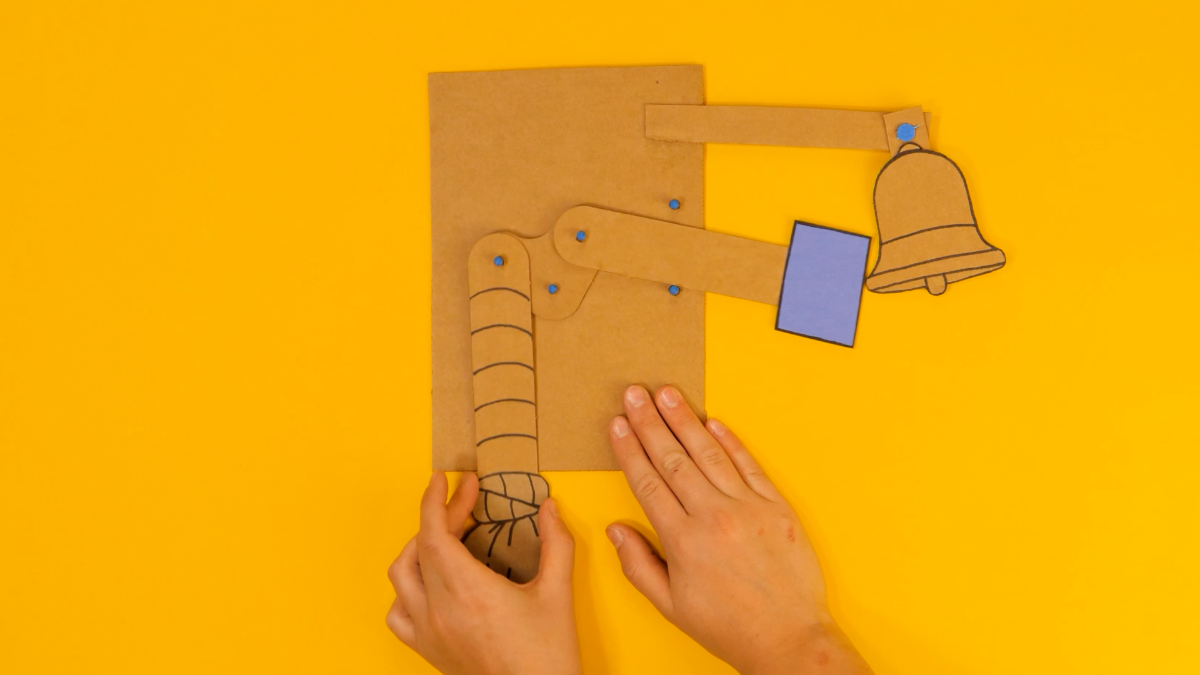
The build unfolds in nine steps. Learners explore their materials, prepare levers and pivots, connect two bars with a free pivot, then learn each of the four mechanical linkage types: reverse motion (sideways push-pull), bell crank (right-angle transfer), parallel motion (vertical-and-horizontal movement), and scissor (extend-and-retract). Once they understand the mechanisms, learners use a printable design sheet to imagine and plan a unique creature or machine, build a paper prototype, and create a final version that disguises the linkage inside a story. Extensions connect machines together into multi-part mega-mechanisms or use the design-sheet framework to solve real-world problems.

Scissors for cutting scrap cardboard and paper prototype parts.
A pencil or dark pen for poking holes in the backing sheet and sketching designs on the printable design sheet.
Tape and art supplies - paper, scrap cardboard, markers, colored paper - for creating components and disguising the mechanism.
1st - 3rd Grade
Question: What do you notice about the different pieces in your kit? How do you think they will come together to make something that moves?
Question: Have you ever used a lever or a pivot before? Can you find one in the room right now?
Question: When two levers are joined by a pivot, how do you think they will move?
Question: What happens when you push one end of a connected lever system? Which direction does the other end move?
Question: What if you wanted something to move up and down when you push a lever sideways?
Question: What if something needs to move sideways and up-and-down at the same time - like a rising sun, or a creature that slides across a scene?
Question: How could you design a mechanism that extends far away from its starting position - and then folds back up again?
Question: Now that you know how each linkage type moves, what will you invent?
Question: What could you add, change, or combine to make your Linkages creation truly one of a kind?
RI.K-2.7 – Use illustrations and words in a text to describe key ideas: Example: Learners refer to the printed Linkages visual guide in their kit to identify which piece is a lever, which is a brad, and how the pivot holes line up - using both the printed illustrations and the educator’s spoken vocabulary to understand the system before assembling their first free pivot.
SL.K-2.1 – Participate in collaborative conversations: Example: Learners describe to a partner what happens when they push on one end of their reverse-motion linkage, using the vocabulary “lever,” “pivot,” and “fixed pivot” to explain why the opposite end moves in the other direction.
RI.3-5.3 – Explain relationships between concepts in a text: Example: Learners explain the cause-and-effect chain in their bell-crank linkage - how pulling the vertical lever causes the angled crank to rotate, which in turn pulls the horizontal hammer toward the imaginary bell - tracing the path of force through the connected levers.
W.3-5.3 – Write narratives to develop real or imagined experiences: Example: Learners write a short story for the creature or machine they designed on their Linkages design sheet, naming their invention, describing what problem it solves or what it does, and explaining how their chosen linkage type powers the moving part of the story.
RST.6-8.3 – Follow a multistep procedure when carrying out experiments: Example: Learners follow the Linkages build sequence precisely - preparing levers and brads, creating a free pivot, anchoring a fixed pivot with a pencil-poked starter hole, and adding guides before testing the system - understanding that each step depends on the previous one or the linkage will jam.
SL.6-8.1 – Engage in collaborative discussions with diverse partners: Example: Learners debate which linkage type is the best fit for a partner’s design challenge during the Problem-Solving with Linkages extension - comparing the trade-offs between reverse motion, bell crank, parallel motion, and scissor linkages and defending their choice with evidence from the mechanism’s motion.
K.MD.A.1 – Describe measurable attributes of objects: Example: Learners compare the lengths of the long levers and short levers in the Linkages kit and describe how a longer lever travels a greater distance when it rotates around the same pivot - connecting the observable attribute of length to the distance the mechanism moves.
K.G.A.1 – Describe objects using names of shapes and relative positions: Example: Learners identify the parallelogram shape formed by a parallel-motion linkage, naming the four sides and describing positional relationships - the top bar stays parallel to the bottom bar, the side bars tilt together - using shape and position vocabulary as they tilt the assembled linkage on the backing board.
3.MD.B.4 – Generate measurement data by measuring lengths: Example: Learners measure how far the end of their reverse-motion linkage travels when they push the opposite end a fixed distance, generating data about the ratio between input and output motion and comparing results across different lever lengths on the same backing board.
4.OA.C.5 – Generate and analyze patterns: Example: Learners observe the push-pull pattern of their reverse-motion linkage - when one lever moves right, the other moves left, over and over - and identify this as a consistent, repeating inverse relationship that they can predict before every push.
6.RP.A.1 – Understand ratio concepts and use ratio reasoning: Example: Learners explore the lever-arm ratio in their bell-crank linkage - a short input lever paired with a long output lever moves a shorter input distance into a longer output distance - and describe the ratio of input-to-output travel in simple terms, discussing how changing the lever lengths would change the ratio.
7.G.A.2 – Draw geometric shapes with given conditions: Example: Learners draw the parallelogram formed by a four-bar parallel-motion linkage on their design sheet, labeling the two pairs of equal-length sides and the fixed pivots - then predict how the parallelogram will tilt when one side is pushed, verifying the prediction by building and testing the linkage.
K-PS2-1 – Motion and Stability: Forces and Interactions: Example: Learners explore how pushing and pulling one end of their Linkages system causes the other end to move in a predictable direction - observing firsthand that a push force transfers through the connected levers and around the fixed pivot to create motion at the far end of the mechanism.
K-2-ETS1-2 – Engineering Design: Develop a simple sketch, drawing, or physical model: Example: Learners sketch their creature or machine on the printable design sheet before building it - drawing where the levers will go, labeling the pivots, and planning how the linkage will be disguised inside the character - then iterate on the design when the first build does not move as expected.
3-PS2-1 – Forces and Interactions: Cause and Effect: Example: Learners investigate how the force of pushing on a reverse-motion linkage causes the opposite end to travel in the reverse direction, testing different push strengths and observing how harder pushes move the mechanism farther - establishing a cause-and-effect relationship between applied force and lever motion.
3-5-ETS1-3 – Plan and carry out fair tests to identify failure points: Example: Learners systematically troubleshoot a stuck Linkages system by checking one variable at a time - is the brad too tight, is the fixed pivot floppy, is there a lever traffic jam, is the backing board too flexible - isolating the failure point before making a fix.
MS-PS3-5 – Construct an argument that a change in kinetic energy means energy was transferred: Example: Learners argue that the creature’s motion at the far end is evidence of energy transferred along the linkage - the output lever starts at rest with zero kinetic energy, and a push at the input end sets it moving. Tracing the push through each brad and fixed pivot shows where the energy went, and why the far end cannot move unless something is pushed at the near end.
MS-ETS1-2 – Engineering Design: Evaluate competing design solutions: Example: Learners compare which linkage type best solves a design challenge - reverse motion for side-to-side motion, bell crank for right-angle transfer, parallel motion for tilting-and-sliding scenes, scissor for reach and extension - evaluating trade-offs in simplicity, distance traveled, and visual effect before committing to a final design.
Pivot fasteners sometimes have legs that catch or stick out in the wrong direction. Have learners look closely at the brad before pushing - the two legs should go in together. If it still catches, pull it out, straighten the legs, and try again. Reversing the brad so the point faces the other way often helps.
The brad is probably pressed too tight. Have learners gently pry the brad’s legs open a little so the levers have room to rotate freely around it. The connection should be firm but not locked.
The lever needs a guide to keep it moving in a straight line. Add a short lever scrap or a pair of brads on either side of the wobbling lever, leaving enough space that it slides easily. If the backing board is floppy, reinforce it with a piece of scrap cardboard taped to the back.
Learners often try to use every piece in the kit, which creates a system with too many moving parts that jam against each other. Gently encourage them to remove parts until the motion is clean - the simpler the linkage, the better it works.
If a learner’s creation needs more room than the die-cut backing sheet provides, hand them a larger piece of scrap cardboard. They can tape or brad-punch a bigger backing board to fit the whole mechanism.