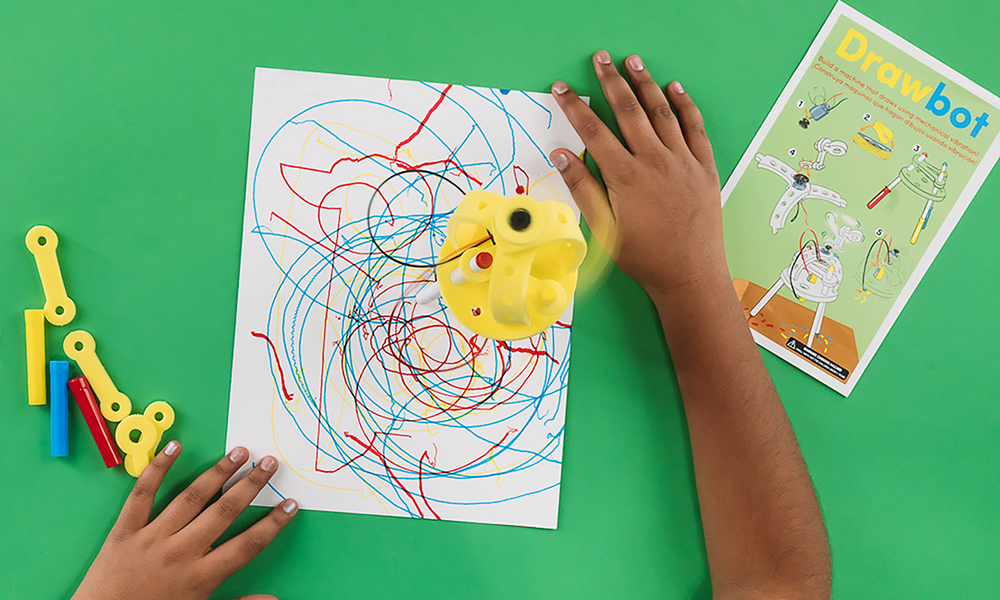
FutureMakers Drawbots combines foam pieces, a spinning off-center weight, and markers into a small vibrating robot that learners build, test, and rebuild into a new design.
Last reviewed September 24, 2026
How to buy
Which Drawbots pack should I buy?
For one learner, the Single Learner Pack costs $8.95. For a class or program, the Small Group Pack of 10 costs $69.50, or $6.95 per learner, and the Class Pack of 25 costs $122.00, or $4.88 per learner. Small Group and Class Pack orders both qualify for purchase orders and tax-exempt purchasing; check "Our organization is tax-exempt" in the quote builder and enter your tax ID number, or submit your tax ID number and a tax-exempt certificate through a free store account if buying directly.
Can I try Drawbots before I buy a class set?
Yes. FutureMakers offers a free sample program at kidsmakethingsbetter.com/samples, and you can ask for Drawbots by name when you request yours. A paid Single Learner Pack ($8.95) also lets you test the build yourself before ordering a class set.
Can I use a purchase order or tax-exempt status to buy Drawbots?
Yes. Drawbots Small Group and Class Pack orders qualify for purchase orders on Net 30 terms and for tax-exempt purchasing, the same as every FutureMakers Spark. See the full how to buy FAQ for purchase order terms, vendor paperwork, and the tax-exempt steps.
About the project
What do learners make with Drawbots, and what's the big idea?
FutureMakers Drawbots combine repositionable foam pieces, a spinning motorized off-center weight, and markers used as legs into a small vibrating robot that draws on its own. It can then be taken apart and rebuilt into a different design. The build covers mechanical vibration from an unbalanced spinning weight, a simple battery-and-motor circuit, and the engineering cycle of build, test, deconstruct, and rebuild. Read the full Drawbots guide for the complete build sequence.
Where can I find the full Drawbots guide and video?
The full Drawbots educator guide, including build photos, standards codes, and troubleshooting, is free and public at the Drawbots guide page, no login required. A video walkthrough of the same build is on YouTube: Drawbots: Build Vibrating Drawing Machines. A separate coaching video and slide deck are available with a free educator account at coach-with-sparks.
Using it in a session
How long does a Drawbots session take, and what age does it fit?
A Drawbots session takes 45 to 60 minutes for grades 2 through 8, the same range the guide's own discussion questions cover, grouped as 2nd to 3rd grade and 4th to 8th grade. A program working with 2nd graders should plan for extra support during the wiring step rather than assume every learner is ready for it independently. See the guide's grade guidance before scheduling.
How many learners does a Drawbots pack serve, and do they build alone or together?
Drawbots comes in a Single Learner Pack, a Small Group Pack of 10, and a Class Pack of 25. Each learner builds and keeps their own three-legged robot individually, and the Collaboration Challenge extension lets two learners combine their finished Drawbots into one larger machine once both are working. See the build steps for the individual build before combining.
What does an educator need to prepare and supply for Drawbots?
An educator should pre-stretch each kit's rubber band several times before class to loosen the elastic, since a stiff new band is a common cause of a weak circuit connection. It also helps to have a projector and screen ready for the presentation slides. The kit supplies the motor, battery, foam pieces, and markers; the only added supply is large paper for the optional dance-party drawing surface. Learners should be reminded not to stretch or pull the foam pieces too hard, since they can break off if forced. Prep takes about 5 to 10 minutes, per the product listing. Full prep notes are in the guide.
What does a first successful Drawbots build look like?
A first successful Drawbots build is a three-legged foam structure standing on its marker legs, holding the battery and motor. The circuit is closed, with both wires tucked under the rubber band touching opposite battery ends. Once the circuit closes, the motor spins the off-center weight and the whole structure vibrates and moves across the table on its own, the signal it is ready for its first drawing test.
What are the most common Drawbots problems and fixes?
The three most common Drawbots problems are a motor that will not spin, a bot that falls over, and a bot whose weight is not spinning. Check every wire connection, since each metal end must touch an opposite battery end under the rubber band, to fix a still motor; adjust leg positioning, length, or angle, or move the motor and battery, to fix a bot that tips over; and check the weight is not bumping the markers and the motor is held tightly to the body if it will not spin freely. See the full troubleshooting guide for every fix.
How can I extend Drawbots for early finishers or older learners?
Early finishers can try the Size Challenge, rebuilding their Drawbot with the fewest parts that still work, or the Pattern Challenge, aiming for lines, circles, or random patterns on paper. Older learners can take on the Speed Challenge, adjusting weight and placement to change how fast the bot moves, or the Collaboration Challenge, combining two Drawbots into one larger machine. The guide lists all four extensions.
Standards and skills
What academic standards does Drawbots meet?
Drawbots carries NGSS codes on forces, engineering design, and energy transfer from kindergarten through middle school, plus Common Core reading, writing, and math codes, all printed on the Drawbots standards page. The table below lists every code. The guide does not carry CASEL or any state-specific social-emotional-learning codes for this Spark; only NGSS and Common Core alignments are documented.
What vocabulary and skills does Drawbots build?
Drawbots introduces the vocabulary of vibration, unbalanced weight, circuit, and iteration, used correctly as learners test, take apart, and rebuild their own machine. The guide leans on peer help by design, noting that very small fingers may need help from a neighbor rather than only the educator, which builds a habit of asking a peer before asking an adult. Every Spark is individually packed so each learner keeps what they build.
Drawbots standards codes
Codes as printed on the Drawbots guide. No CASEL or state-specific codes are documented for this Spark.
Framework
Code
What it covers
NGSS
K-PS2-1
Plan and conduct an investigation of forces
NGSS
K-2-ETS1-2
Develop a simple model or prototype
NGSS
3-5-ETS1-1
Define a design problem with criteria and constraints
NGSS
3-5-ETS1-3
Plan and carry out fair tests
NGSS
MS-PS3-5
Construct an explanation of energy transfer
NGSS
MS-ETS1-2
Evaluate competing design solutions
Common Core ELA
RI.K-2.7
Use information from illustrations
Common Core ELA
SL.K-2.1
Participate in collaborative conversations
Common Core ELA
RI.3-5.7
Use information from text features and diagrams
Common Core ELA
W.3-5.2
Write informative and explanatory texts
Common Core ELA
RST.6-8.7
Integrate quantitative and technical information
Common Core ELA
W.6-8.1
Write arguments with claims and evidence
Common Core Math
K.MD.A.1
Describe measurable attributes of objects
Common Core Math
1.G.A.2
Compose two- and three-dimensional shapes
Common Core Math
3.MD.B.4
Generate measurement data
Common Core Math
4.MD.A.3
Apply area and perimeter formulas
Common Core Math
6.RP.A.3
Use ratio reasoning to solve problems
Common Core Math
7.G.A.2
Draw geometric shapes with given conditions
Who uses it and how
How do art and STEM teachers use Drawbots?
Art and STEM teachers use FutureMakers' own Drawbots design-challenge slide deck, published on the company blog and used in hundreds of classrooms. It runs a vibrating-robot lesson that pairs a circuits idea with a drawing outcome. FutureMakers also books Drawbots informally through Arts for Learning Maryland alongside its three catalog Visual Art projects, Art Machines, Blendies, and Crankie Contraptions. See how art and STEM classrooms use Sparks and read Building Confidence: Drawing Machines for the original design-challenge deck.
Do libraries use Drawbots for programs?
Yes. FutureMakers' own blog post on Drawbots, written by founder Matt Barinholtz, names libraries directly as one of the settings where its design-challenge slide deck has been used, alongside classrooms and youth centers. A Drawbots build fits a single library session well since the core build finishes in 45 to 60 minutes and the deck was written to be led without a science background. See how libraries use Sparks for more.
Do after-school clubs, camps, and Scouting programs use Drawbots?
Yes. The Drawbots Small Group Pack listing names this audience directly: it is written for after-school clubs, Scouting programs, gifted and talented classes, STEM activity stations, and make-and-take projects for special events. The 45- to 60-minute build fits a single after-school club meeting or camp session without needing extra equipment beyond a projector for the slides. See how after-school and camp programs use Sparks.
<script type="application/ld+json">{"@context": "https://schema.org", "@type": "FAQPage", "mainEntity": [{"@type": "Question", "name": "Which Drawbots pack should I buy?", "acceptedAnswer": {"@type": "Answer", "text": "For one learner, the Single Learner Pack costs $8.95. For a class or program, the Small Group Pack of 10 costs $69.50, or $6.95 per learner, and the Class Pack of 25 costs $122.00, or $4.88 per learner. Small Group and Class Pack orders both qualify for purchase orders and tax-exempt purchasing; check \"Our organization is tax-exempt\" in the quote builder and enter your tax ID number, or submit your tax ID number and a tax-exempt certificate through a free store account if buying directly."}}, {"@type": "Question", "name": "Can I try Drawbots before I buy a class set?", "acceptedAnswer": {"@type": "Answer", "text": "Yes. FutureMakers offers a free sample program at kidsmakethingsbetter.com/samples , and you can ask for Drawbots by name when you request yours. A paid Single Learner Pack ($8.95) also lets you test the build yourself before ordering a class set."}}, {"@type": "Question", "name": "Can I use a purchase order or tax-exempt status to buy Drawbots?", "acceptedAnswer": {"@type": "Answer", "text": "Yes. Drawbots Small Group and Class Pack orders qualify for purchase orders on Net 30 terms and for tax-exempt purchasing, the same as every FutureMakers Spark. See the full how to buy FAQ for purchase order terms, vendor paperwork, and the tax-exempt steps."}}, {"@type": "Question", "name": "What do learners make with Drawbots, and what's the big idea?", "acceptedAnswer": {"@type": "Answer", "text": "FutureMakers Drawbots combine repositionable foam pieces, a spinning motorized off-center weight, and markers used as legs into a small vibrating robot that draws on its own. It can then be taken apart and rebuilt into a different design. The build covers mechanical vibration from an unbalanced spinning weight, a simple battery-and-motor circuit, and the engineering cycle of build, test, deconstruct, and rebuild. Read the full Drawbots guide for the complete build sequence."}}, {"@type": "Question", "name": "Where can I find the full Drawbots guide and video?", "acceptedAnswer": {"@type": "Answer", "text": "The full Drawbots educator guide, including build photos, standards codes, and troubleshooting, is free and public at the Drawbots guide page , no login required. A video walkthrough of the same build is on YouTube: Drawbots: Build Vibrating Drawing Machines . A separate coaching video and slide deck are available with a free educator account at coach-with-sparks ."}}, {"@type": "Question", "name": "How long does a Drawbots session take, and what age does it fit?", "acceptedAnswer": {"@type": "Answer", "text": "A Drawbots session takes 45 to 60 minutes for grades 2 through 8, the same range the guide's own discussion questions cover, grouped as 2nd to 3rd grade and 4th to 8th grade. A program working with 2nd graders should plan for extra support during the wiring step rather than assume every learner is ready for it independently. See the guide's grade guidance before scheduling."}}, {"@type": "Question", "name": "How many learners does a Drawbots pack serve, and do they build alone or together?", "acceptedAnswer": {"@type": "Answer", "text": "Drawbots comes in a Single Learner Pack, a Small Group Pack of 10, and a Class Pack of 25. Each learner builds and keeps their own three-legged robot individually, and the Collaboration Challenge extension lets two learners combine their finished Drawbots into one larger machine once both are working. See the build steps for the individual build before combining."}}, {"@type": "Question", "name": "What does an educator need to prepare and supply for Drawbots?", "acceptedAnswer": {"@type": "Answer", "text": "An educator should pre-stretch each kit's rubber band several times before class to loosen the elastic, since a stiff new band is a common cause of a weak circuit connection. It also helps to have a projector and screen ready for the presentation slides. The kit supplies the motor, battery, foam pieces, and markers; the only added supply is large paper for the optional dance-party drawing surface. Learners should be reminded not to stretch or pull the foam pieces too hard, since they can break off if forced. Prep takes about 5 to 10 minutes, per the product listing. Full prep notes are in the guide ."}}, {"@type": "Question", "name": "What does a first successful Drawbots build look like?", "acceptedAnswer": {"@type": "Answer", "text": "A first successful Drawbots build is a three-legged foam structure standing on its marker legs, holding the battery and motor. The circuit is closed, with both wires tucked under the rubber band touching opposite battery ends. Once the circuit closes, the motor spins the off-center weight and the whole structure vibrates and moves across the table on its own, the signal it is ready for its first drawing test."}}, {"@type": "Question", "name": "What are the most common Drawbots problems and fixes?", "acceptedAnswer": {"@type": "Answer", "text": "The three most common Drawbots problems are a motor that will not spin, a bot that falls over, and a bot whose weight is not spinning. Check every wire connection, since each metal end must touch an opposite battery end under the rubber band, to fix a still motor; adjust leg positioning, length, or angle, or move the motor and battery, to fix a bot that tips over; and check the weight is not bumping the markers and the motor is held tightly to the body if it will not spin freely. See the full troubleshooting guide for every fix."}}, {"@type": "Question", "name": "How can I extend Drawbots for early finishers or older learners?", "acceptedAnswer": {"@type": "Answer", "text": "Early finishers can try the Size Challenge, rebuilding their Drawbot with the fewest parts that still work, or the Pattern Challenge, aiming for lines, circles, or random patterns on paper. Older learners can take on the Speed Challenge, adjusting weight and placement to change how fast the bot moves, or the Collaboration Challenge, combining two Drawbots into one larger machine. The guide lists all four extensions ."}}, {"@type": "Question", "name": "What academic standards does Drawbots meet?", "acceptedAnswer": {"@type": "Answer", "text": "Drawbots carries NGSS codes on forces, engineering design, and energy transfer from kindergarten through middle school, plus Common Core reading, writing, and math codes, all printed on the Drawbots standards page . The table below lists every code. The guide does not carry CASEL or any state-specific social-emotional-learning codes for this Spark; only NGSS and Common Core alignments are documented."}}, {"@type": "Question", "name": "What vocabulary and skills does Drawbots build?", "acceptedAnswer": {"@type": "Answer", "text": "Drawbots introduces the vocabulary of vibration, unbalanced weight, circuit, and iteration, used correctly as learners test, take apart, and rebuild their own machine. The guide leans on peer help by design, noting that very small fingers may need help from a neighbor rather than only the educator, which builds a habit of asking a peer before asking an adult. Every Spark is individually packed so each learner keeps what they build."}}, {"@type": "Question", "name": "How do art and STEM teachers use Drawbots?", "acceptedAnswer": {"@type": "Answer", "text": "Art and STEM teachers use FutureMakers' own Drawbots design-challenge slide deck, published on the company blog and used in hundreds of classrooms. It runs a vibrating-robot lesson that pairs a circuits idea with a drawing outcome. FutureMakers also books Drawbots informally through Arts for Learning Maryland alongside its three catalog Visual Art projects, Art Machines, Blendies, and Crankie Contraptions. See how art and STEM classrooms use Sparks and read Building Confidence: Drawing Machines for the original design-challenge deck."}}, {"@type": "Question", "name": "Do libraries use Drawbots for programs?", "acceptedAnswer": {"@type": "Answer", "text": "Yes. FutureMakers' own blog post on Drawbots, written by founder Matt Barinholtz, names libraries directly as one of the settings where its design-challenge slide deck has been used, alongside classrooms and youth centers. A Drawbots build fits a single library session well since the core build finishes in 45 to 60 minutes and the deck was written to be led without a science background. See how libraries use Sparks for more."}}, {"@type": "Question", "name": "Do after-school clubs, camps, and Scouting programs use Drawbots?", "acceptedAnswer": {"@type": "Answer", "text": "Yes. The Drawbots Small Group Pack listing names this audience directly: it is written for after-school clubs, Scouting programs, gifted and talented classes, STEM activity stations, and make-and-take projects for special events. The 45- to 60-minute build fits a single after-school club meeting or camp session without needing extra equipment beyond a projector for the slides. See how after-school and camp programs use Sparks ."}}]}</script>