Linkages: Answers for Educators and Program Leaders
Linkages: Answers for Educators and Program Leaders
Linkages is a FutureMakers Spark where learners connect cardboard levers with plastic pivots to build four kinds of mechanical linkages, then design their own moving creature or machine. It is a 30 to 45 minute screen-free activity for kindergarten through 8th grade, and it anchors the live Art Club bundle for classroom art programs.
Last reviewed September 24, 2026
How to buy
Which Linkages pack should I buy?
For one learner, the Single Learner Pack costs $8.95. For a class or program, the Small Group Pack of 10 costs $69.50, or $6.95 per learner, and the Class Pack of 25 costs $122.00, or $4.88 per learner. Small Group and Class Pack orders both qualify for purchase orders and tax-exempt purchasing; check "Our organization is tax-exempt" in the quote builder and enter your tax ID number, or submit your tax ID number and a tax-exempt certificate through a free store account if buying directly.
Can I order fewer than 10 Linkages kits if my group is smaller?
Yes. Small Group Packs and Class Packs come in fixed sizes of 10 and 25, but the $8.95 Single Learner Pack lets a program order any exact quantity below 10. This is the option FutureMakers points buyers to when a real order does not divide evenly into a full 10-pack.
Can I use a purchase order or tax-exempt status to buy Linkages?
Yes. Linkages Small Group and Class Pack orders qualify for purchase orders on Net 30 terms and for tax-exempt purchasing, the same as every FutureMakers Spark. See the full how to buy FAQ for purchase order terms, vendor paperwork, and the tax-exempt steps.
Linkages pack sizes and live prices
Pack
Units
Price
Per learner
Single Learner Pack
1
$8.95
$8.95
Small Group Pack
10
$69.50
$6.95
Class Pack
25
$122.00
$4.88
About the project
What do learners make with Linkages, and what's the big idea?
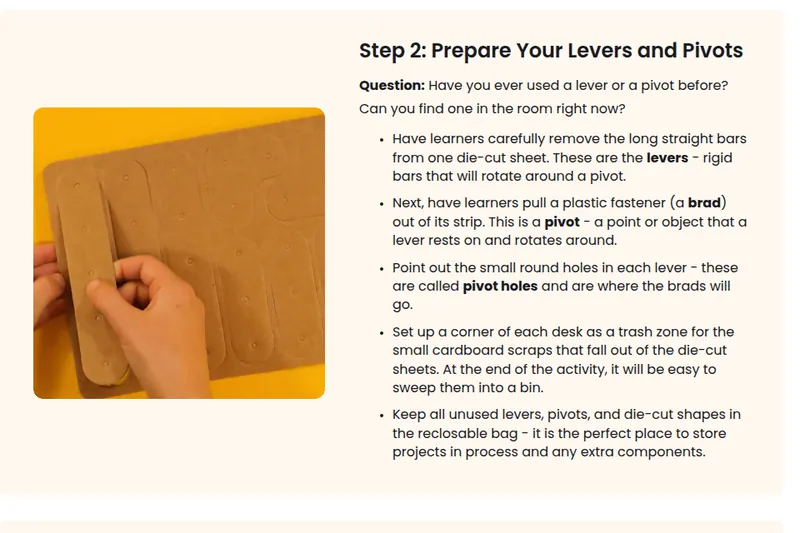
Linkages learners connect cardboard levers with plastic pivot fasteners to build four types of mechanical linkage: reverse motion, bell crank, parallel motion, and scissor. Once they understand how each one transfers force in a different direction, learners design their own moving creature or machine that hides the mechanism inside a story or character. The big idea is the difference between a free pivot, where two levers slide and rotate against each other, and a fixed pivot that anchors a lever in place. The full build sequence is in the Linkages guide.
What grade levels is Linkages designed for?
Linkages is designed for kindergarten through 8th grade. The guide's own pre-activity questions are grouped into a 1st to 3rd grade band and a 4th to 8th grade band, with no separate PK/K set of questions, though the Puppets and Marionettes extension is written specifically for grades K to 3. In practice, the youngest builders do best with the puppet extension while older learners move into the open-ended design challenge.
What extensions are there for early finishers or older learners?
Early finishers and younger builders can move into Puppets and Marionettes, built for grades K to 3, or try everyday-object builds like a fan, a pinwheel, or a see-saw. Learners in grade 4 and up get a Problem-Solving with Linkages worksheet that formalizes design thinking, plus a Many Moving Machines extension that combines several finished linkage projects into one larger mega-machine. A multi-session design project is also documented for classes that want to spread the build across more than one class period.
Using it in a session
How long does a Linkages session take?
Plan on 30 to 45 minutes for a single session covering the four linkage types, or about 15 minutes as a quick activity station. Classes that add the open-ended creature design or the Many Moving Machines extension should plan for a second, separate session, since those extensions are written as follow-on activities rather than part of the core 30 to 45 minutes.
How many learners does one pack serve, and how should I group them?
Linkages is a 1:1 build, so a Small Group Pack of 10 serves 10 learners and a Class Pack of 25 serves 25, each building their own set of linkages. The Many Moving Machines extension is the one grouped activity: pairs of learners connect their finished projects together, then pairs combine into groups of four to build one larger combined machine.
What does an educator need to prepare and supply for Linkages?
The core kit needs scissors, a pencil or dark pen, and tape or basic art supplies like paper and markers for decorating the finished creature or machine. Before the session, it helps to know that the pivot fasteners sometimes need reversing or flattening if they catch when pushed through the cardboard. Keep scrap cardboard on hand too, in case a learner wants extra levers or a bigger backing board. Prep takes about 5 to 10 minutes, per the product listing.
What does a first successful Linkages build look like?
A first success is two cardboard levers joined by a single free pivot that slide and rotate smoothly against each other. Every one of the four linkage types, reverse motion, bell crank, parallel motion, and scissor, builds from that same basic connection, so getting one clean free pivot working is the foundation for the rest of the project.
What are the most common problems and fixes?
Three problems cover most Linkages troubleshooting. A brad will not go through the pivot hole: check that both legs go in together, and reverse the brad if needed. The levers are stuck: the brad is pressed too tight, so gently pry its legs open a little. A lever wobbles or falls off the board: add a guide lever or a second brad on either side, and reinforce a floppy backing board with scrap cardboard. Full troubleshooting is on the Linkages guide's troubleshooting section.
Standards and skills
What academic standards does Linkages align to?
Linkages carries specific NGSS, Common Core ELA, and Common Core Math codes on its guide, spanning kindergarten through grade 8. NGSS codes cover forces and interactions plus the full engineering design cycle, from a simple sketch in K-2-ETS1-2 to evaluating competing solutions in MS-ETS1-2. The guide does not carry National Core Arts Standards or CASEL social-emotional competency codes. The full table of codes is below.
Where can I find the full Linkages guide and video?
Every code below appears on kidsmakethingsbetter.com/inst/linkages. No CASEL or arts-standards codes appear on the guide.
Standard family
Code
What it covers
NGSS
K-PS2-1
Motion and Stability: Forces and Interactions
NGSS
K-2-ETS1-2
Develop a simple sketch, drawing, or physical model
NGSS
3-PS2-1
Forces and Interactions: Cause and Effect
NGSS
3-5-ETS1-3
Plan and carry out fair tests to identify failure points
NGSS
MS-PS3-5
A change in kinetic energy means energy was transferred
NGSS
MS-ETS1-2
Evaluate competing design solutions
Common Core ELA
RI.K-2.7
Use illustrations and words to describe key ideas
Common Core ELA
SL.K-2.1
Participate in collaborative conversations
Common Core ELA
RI.3-5.3
Explain relationships between concepts in a text
Common Core ELA
W.3-5.3
Write narratives to develop real or imagined experiences
Common Core ELA
RST.6-8.3
Follow a multistep procedure carrying out experiments
Common Core ELA
SL.6-8.1
Engage in collaborative discussions with diverse partners
Common Core Math
K.MD.A.1
Describe measurable attributes of objects
Common Core Math
K.G.A.1
Describe objects using shapes and relative positions
Common Core Math
3.MD.B.4
Generate measurement data by measuring lengths
Common Core Math
4.OA.C.5
Generate and analyze patterns
Common Core Math
6.RP.A.1
Understand ratio concepts and use ratio reasoning
Common Core Math
7.G.A.2
Draw geometric shapes with given conditions
Who uses it and how
Why do art teachers pair Linkages with other Sparks in one classroom bundle?
FutureMakers sells Linkages as one third of its live Art Club bundle, alongside Crankie Contraptions and Drawbots. The bundle is priced at $208.50 for a Small Group set of 10 of each, marketed "for grades 2 and up." All three Sparks turn a mechanism into a visual-art object, which is why they are packaged together for classroom art programs rather than sold only as separate science kits. See our classroom art and STEM answers page for how art teachers use mechanism-based Sparks.
<script type="application/ld+json">{"@context": "https://schema.org", "@type": "FAQPage", "mainEntity": [{"@type": "Question", "name": "Which Linkages pack should I buy?", "acceptedAnswer": {"@type": "Answer", "text": "For one learner, the Single Learner Pack costs $8.95. For a class or program, the Small Group Pack of 10 costs $69.50, or $6.95 per learner, and the Class Pack of 25 costs $122.00, or $4.88 per learner. Small Group and Class Pack orders both qualify for purchase orders and tax-exempt purchasing; check \"Our organization is tax-exempt\" in the quote builder and enter your tax ID number, or submit your tax ID number and a tax-exempt certificate through a free store account if buying directly."}}, {"@type": "Question", "name": "Can I order fewer than 10 Linkages kits if my group is smaller?", "acceptedAnswer": {"@type": "Answer", "text": "Yes. Small Group Packs and Class Packs come in fixed sizes of 10 and 25, but the $8.95 Single Learner Pack lets a program order any exact quantity below 10. This is the option FutureMakers points buyers to when a real order does not divide evenly into a full 10-pack."}}, {"@type": "Question", "name": "Can I use a purchase order or tax-exempt status to buy Linkages?", "acceptedAnswer": {"@type": "Answer", "text": "Yes. Linkages Small Group and Class Pack orders qualify for purchase orders on Net 30 terms and for tax-exempt purchasing, the same as every FutureMakers Spark. See the full how to buy FAQ for purchase order terms, vendor paperwork, and the tax-exempt steps."}}, {"@type": "Question", "name": "What do learners make with Linkages, and what's the big idea?", "acceptedAnswer": {"@type": "Answer", "text": "Linkages learners connect cardboard levers with plastic pivot fasteners to build four types of mechanical linkage: reverse motion, bell crank, parallel motion, and scissor. Once they understand how each one transfers force in a different direction, learners design their own moving creature or machine that hides the mechanism inside a story or character. The big idea is the difference between a free pivot, where two levers slide and rotate against each other, and a fixed pivot that anchors a lever in place. The full build sequence is in the Linkages guide ."}}, {"@type": "Question", "name": "What grade levels is Linkages designed for?", "acceptedAnswer": {"@type": "Answer", "text": "Linkages is designed for kindergarten through 8th grade. The guide's own pre-activity questions are grouped into a 1st to 3rd grade band and a 4th to 8th grade band, with no separate PK/K set of questions, though the Puppets and Marionettes extension is written specifically for grades K to 3. In practice, the youngest builders do best with the puppet extension while older learners move into the open-ended design challenge."}}, {"@type": "Question", "name": "What extensions are there for early finishers or older learners?", "acceptedAnswer": {"@type": "Answer", "text": "Early finishers and younger builders can move into Puppets and Marionettes, built for grades K to 3, or try everyday-object builds like a fan, a pinwheel, or a see-saw. Learners in grade 4 and up get a Problem-Solving with Linkages worksheet that formalizes design thinking, plus a Many Moving Machines extension that combines several finished linkage projects into one larger mega-machine. A multi-session design project is also documented for classes that want to spread the build across more than one class period."}}, {"@type": "Question", "name": "How long does a Linkages session take?", "acceptedAnswer": {"@type": "Answer", "text": "Plan on 30 to 45 minutes for a single session covering the four linkage types, or about 15 minutes as a quick activity station. Classes that add the open-ended creature design or the Many Moving Machines extension should plan for a second, separate session, since those extensions are written as follow-on activities rather than part of the core 30 to 45 minutes."}}, {"@type": "Question", "name": "How many learners does one pack serve, and how should I group them?", "acceptedAnswer": {"@type": "Answer", "text": "Linkages is a 1:1 build, so a Small Group Pack of 10 serves 10 learners and a Class Pack of 25 serves 25, each building their own set of linkages. The Many Moving Machines extension is the one grouped activity: pairs of learners connect their finished projects together, then pairs combine into groups of four to build one larger combined machine."}}, {"@type": "Question", "name": "What does an educator need to prepare and supply for Linkages?", "acceptedAnswer": {"@type": "Answer", "text": "The core kit needs scissors, a pencil or dark pen, and tape or basic art supplies like paper and markers for decorating the finished creature or machine. Before the session, it helps to know that the pivot fasteners sometimes need reversing or flattening if they catch when pushed through the cardboard. Keep scrap cardboard on hand too, in case a learner wants extra levers or a bigger backing board. Prep takes about 5 to 10 minutes, per the product listing."}}, {"@type": "Question", "name": "What does a first successful Linkages build look like?", "acceptedAnswer": {"@type": "Answer", "text": "A first success is two cardboard levers joined by a single free pivot that slide and rotate smoothly against each other. Every one of the four linkage types, reverse motion, bell crank, parallel motion, and scissor, builds from that same basic connection, so getting one clean free pivot working is the foundation for the rest of the project."}}, {"@type": "Question", "name": "What are the most common problems and fixes?", "acceptedAnswer": {"@type": "Answer", "text": "Three problems cover most Linkages troubleshooting. A brad will not go through the pivot hole: check that both legs go in together, and reverse the brad if needed. The levers are stuck: the brad is pressed too tight, so gently pry its legs open a little. A lever wobbles or falls off the board: add a guide lever or a second brad on either side, and reinforce a floppy backing board with scrap cardboard. Full troubleshooting is on the Linkages guide's troubleshooting section ."}}, {"@type": "Question", "name": "What academic standards does Linkages align to?", "acceptedAnswer": {"@type": "Answer", "text": "Linkages carries specific NGSS, Common Core ELA, and Common Core Math codes on its guide, spanning kindergarten through grade 8. NGSS codes cover forces and interactions plus the full engineering design cycle, from a simple sketch in K-2-ETS1-2 to evaluating competing solutions in MS-ETS1-2. The guide does not carry National Core Arts Standards or CASEL social-emotional competency codes. The full table of codes is below."}}, {"@type": "Question", "name": "Where can I find the full Linkages guide and video?", "acceptedAnswer": {"@type": "Answer", "text": "The full illustrated Linkages guide, with the four linkage types, standards table, and troubleshooting, is at kidsmakethingsbetter.com/inst/linkages . The companion video is on YouTube at Linkages: Build Levers, Pivots and Moving Creatures . Both are free to view, and a free educator account opens the slide decks too, at Coach with Sparks ."}}, {"@type": "Question", "name": "Why do art teachers pair Linkages with other Sparks in one classroom bundle?", "acceptedAnswer": {"@type": "Answer", "text": "FutureMakers sells Linkages as one third of its live Art Club bundle, alongside Crankie Contraptions and Drawbots. The bundle is priced at $208.50 for a Small Group set of 10 of each, marketed \"for grades 2 and up.\" All three Sparks turn a mechanism into a visual-art object, which is why they are packaged together for classroom art programs rather than sold only as separate science kits. See our classroom art and STEM answers page for how art teachers use mechanism-based Sparks."}}]}</script>