Screen Machines: Answers for Educators and Program Leaders
Screen Machines: Answers for Educators and Program Leaders
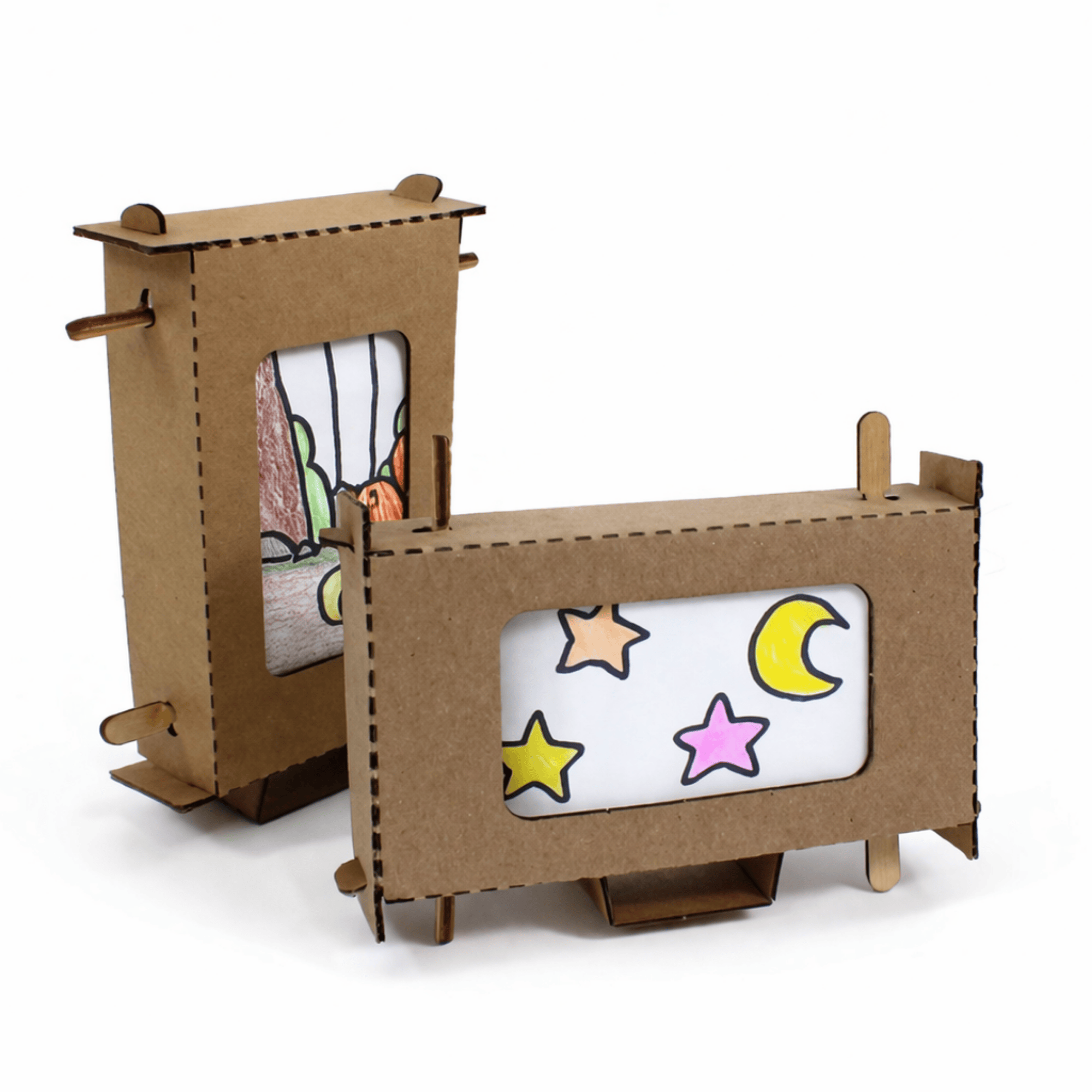
Screen Machines has learners build a hand-cranked cardboard scroll viewer and tell an original story across it, in a 1:1 build sized for a Small Group Pack of 10 or a Class Pack of 25.
Last reviewed September 24, 2026
How to buy
Which Screen Machines pack should I buy?
For one learner, the Single Learner Pack costs $8.95. For a class or program, the Small Group Pack of 10 costs $59.50, or $5.95 per learner, and the Class Pack of 25 costs $105.00, or $4.20 per learner. Small Group and Class Pack orders both qualify for purchase orders and tax-exempt purchasing; check "Our organization is tax-exempt" in the quote builder and enter your tax ID number, or submit your tax ID number and a tax-exempt certificate through a free store account if buying directly.
Can I try Screen Machines before I buy a class set?
Yes. FutureMakers offers a free sample program at kidsmakethingsbetter.com/samples, and you can ask for Screen Machines by name when you request yours. A paid Single Learner Pack ($8.95) also lets you test the build yourself before ordering a class set.
Can I use a purchase order or tax-exempt status to buy Screen Machines?
Yes. Screen Machines Small Group and Class Pack orders qualify for purchase orders on Net 30 terms and for tax-exempt purchasing, the same as every FutureMakers Spark. See the full how to buy FAQ for purchase order terms, vendor paperwork, and the tax-exempt steps.
About the project
What do learners make with Screen Machines and what's the big idea?
Screen Machines has learners fold a laser-cut cardboard frame into a rigid viewing screen, then draw an original story with a beginning, middle, and end across a paper scroll. They thread the scroll through two wooden handles so that turning one crank unrolls the story across a window like a tiny movie. The big idea is narrative structure: FutureMakers' guide has learners identify a character, setting, and action before drawing, and treats the scroll's direction, horizontal or vertical, as part of the story's meaning. See the Screen Machines guide for the full build.
What's included in the Screen Machines kit?
Each Screen Machines kit includes a laser-cut cardboard frame with a center piece that becomes its stand, plus a printed guide sheet that cuts into four blank scroll strips. It also includes a pair of wooden scroll handles that snap apart into two pieces, and a reusable resealable bag. FutureMakers also offers a free printable Story Design Worksheet and a Blank Scroll Strip template on its website if a learner wants extra strips beyond the four in the kit. Nothing else is required for the mechanism itself. See the full parts list.
Using it in a session
How long does a Screen Machines session take?
A Screen Machines session runs 45 to 60 minutes. A second story or one of the collaborative extensions adds time on top of the core build, so plan the full hour for a first attempt. See the full guide for the build sequence.
How many learners does one Screen Machines pack serve, and how should I group them?
A Screen Machines Small Group Pack serves 10 learners and a Class Pack serves 25, with each kit built as a 1:1 project: every learner writes and draws their own story. FutureMakers' guide adds two collaborative extensions on top of that base: Collaborative Stories splits authorship of one scroll across two or three learners, one drawing the beginning, the next the middle, and a third the ending, and Pass the Story turns the same idea into a surprise-ending relay. Plan one kit per learner for the core build. Build steps.
What does an educator need to prepare and supply for Screen Machines?
The educator needs to supply scissors for cutting the printed sheet into scroll strips, pencils for sketching story ideas, and markers or other drawing materials for the finished illustrations. The frame, handles, and scroll strips are all in the kit. If a learner wants to extend a finished story past the four included strips, print FutureMakers' free Blank Scroll Strip template and have a glue stick or tape on hand to join strips end to end. Prep takes about 5 to 10 minutes, per the product listing. Full prep list.
What does a first successful Screen Machines build look like?
A first successful Screen Machines build is a hand-drawn story with a clear beginning, middle, and end that scrolls smoothly across the frame's viewing window when a learner turns the handle. FutureMakers' guide names this exact moment, turning the handle to watch the completed story scroll across the screen, as the target before learners move to a second story or a collaborative extension. The story doesn't need to be long or polished. See the guide's stand-alone goals.
What are the most common problems and fixes with Screen Machines?
Three problems come up most with Screen Machines. The scroll shows blank when turned: the art was threaded facing inward, so unroll it, flip it so the art faces out, and reinstall it. The frame's tabs won't stay in their slots: bend a tab slightly sideways before pushing it in, and make sure the perforations were worked loose first. The story's edges get cut off: redraw on a fresh strip, keeping the art inside the faint end marks. Full troubleshooting, including a fourth fix for worn handle slots, is in the Screen Machines guide's troubleshooting section.
What extensions can I offer early finishers or older learners with Screen Machines?
Early finishers can try Collaborative Stories, splitting one scroll's authorship across two or three learners, or Pass the Story, a relay where each learner adds a surprise twist without seeing what came before. A fast finisher can also glue strips end to end to Extend a Story past the frame's four-strip limit, or redesign their story for the opposite scroll direction to see how direction changes the meaning. Older groups can close with a Story Gallery, screening every finished Screen Machine like a mini film festival. Extension instructions.
Standards and skills
What academic standards does Screen Machines align to?
Screen Machines' guide documents Next Generation Science Standards (NGSS) codes from kindergarten through middle school, including K-2-ETS1-1, K-2-ETS1-2, 3-5-ETS1-2, 3-5-ETS1-3, MS-ETS1-3, and MS-ETS1-4. It also documents Common Core codes in both ELA and Math across the same grade bands, heavier on narrative-writing ELA standards than most Sparks given the storytelling core of the build; see the table below for the full list. The guide lists NGSS and Common Core codes. It doesn't list CASEL codes.
Where can I find the full Screen Machines guide and video?
<script type="application/ld+json">{"@context": "https://schema.org", "@type": "FAQPage", "mainEntity": [{"@type": "Question", "name": "Which Screen Machines pack should I buy?", "acceptedAnswer": {"@type": "Answer", "text": "For one learner, the Single Learner Pack costs $8.95. For a class or program, the Small Group Pack of 10 costs $59.50, or $5.95 per learner, and the Class Pack of 25 costs $105.00, or $4.20 per learner. Small Group and Class Pack orders both qualify for purchase orders and tax-exempt purchasing; check \"Our organization is tax-exempt\" in the quote builder and enter your tax ID number, or submit your tax ID number and a tax-exempt certificate through a free store account if buying directly."}}, {"@type": "Question", "name": "Can I try Screen Machines before I buy a class set?", "acceptedAnswer": {"@type": "Answer", "text": "Yes. FutureMakers offers a free sample program at kidsmakethingsbetter.com/samples , and you can ask for Screen Machines by name when you request yours. A paid Single Learner Pack ($8.95) also lets you test the build yourself before ordering a class set."}}, {"@type": "Question", "name": "Can I use a purchase order or tax-exempt status to buy Screen Machines?", "acceptedAnswer": {"@type": "Answer", "text": "Yes. Screen Machines Small Group and Class Pack orders qualify for purchase orders on Net 30 terms and for tax-exempt purchasing, the same as every FutureMakers Spark. See the full how to buy FAQ for purchase order terms, vendor paperwork, and the tax-exempt steps."}}, {"@type": "Question", "name": "What do learners make with Screen Machines and what's the big idea?", "acceptedAnswer": {"@type": "Answer", "text": "Screen Machines has learners fold a laser-cut cardboard frame into a rigid viewing screen, then draw an original story with a beginning, middle, and end across a paper scroll. They thread the scroll through two wooden handles so that turning one crank unrolls the story across a window like a tiny movie. The big idea is narrative structure: FutureMakers' guide has learners identify a character, setting, and action before drawing, and treats the scroll's direction, horizontal or vertical, as part of the story's meaning. See the Screen Machines guide for the full build."}}, {"@type": "Question", "name": "What's included in the Screen Machines kit?", "acceptedAnswer": {"@type": "Answer", "text": "Each Screen Machines kit includes a laser-cut cardboard frame with a center piece that becomes its stand, plus a printed guide sheet that cuts into four blank scroll strips. It also includes a pair of wooden scroll handles that snap apart into two pieces, and a reusable resealable bag. FutureMakers also offers a free printable Story Design Worksheet and a Blank Scroll Strip template on its website if a learner wants extra strips beyond the four in the kit. Nothing else is required for the mechanism itself. See the full parts list ."}}, {"@type": "Question", "name": "How long does a Screen Machines session take?", "acceptedAnswer": {"@type": "Answer", "text": "A Screen Machines session runs 45 to 60 minutes. A second story or one of the collaborative extensions adds time on top of the core build, so plan the full hour for a first attempt. See the full guide for the build sequence."}}, {"@type": "Question", "name": "How many learners does one Screen Machines pack serve, and how should I group them?", "acceptedAnswer": {"@type": "Answer", "text": "A Screen Machines Small Group Pack serves 10 learners and a Class Pack serves 25, with each kit built as a 1:1 project: every learner writes and draws their own story. FutureMakers' guide adds two collaborative extensions on top of that base: Collaborative Stories splits authorship of one scroll across two or three learners, one drawing the beginning, the next the middle, and a third the ending, and Pass the Story turns the same idea into a surprise-ending relay. Plan one kit per learner for the core build. Build steps ."}}, {"@type": "Question", "name": "What does an educator need to prepare and supply for Screen Machines?", "acceptedAnswer": {"@type": "Answer", "text": "The educator needs to supply scissors for cutting the printed sheet into scroll strips, pencils for sketching story ideas, and markers or other drawing materials for the finished illustrations. The frame, handles, and scroll strips are all in the kit. If a learner wants to extend a finished story past the four included strips, print FutureMakers' free Blank Scroll Strip template and have a glue stick or tape on hand to join strips end to end. Prep takes about 5 to 10 minutes, per the product listing. Full prep list ."}}, {"@type": "Question", "name": "What does a first successful Screen Machines build look like?", "acceptedAnswer": {"@type": "Answer", "text": "A first successful Screen Machines build is a hand-drawn story with a clear beginning, middle, and end that scrolls smoothly across the frame's viewing window when a learner turns the handle. FutureMakers' guide names this exact moment, turning the handle to watch the completed story scroll across the screen, as the target before learners move to a second story or a collaborative extension. The story doesn't need to be long or polished. See the guide's stand-alone goals ."}}, {"@type": "Question", "name": "What are the most common problems and fixes with Screen Machines?", "acceptedAnswer": {"@type": "Answer", "text": "Three problems come up most with Screen Machines. The scroll shows blank when turned: the art was threaded facing inward, so unroll it, flip it so the art faces out, and reinstall it. The frame's tabs won't stay in their slots: bend a tab slightly sideways before pushing it in, and make sure the perforations were worked loose first. The story's edges get cut off: redraw on a fresh strip, keeping the art inside the faint end marks. Full troubleshooting, including a fourth fix for worn handle slots, is in the Screen Machines guide's troubleshooting section ."}}, {"@type": "Question", "name": "What extensions can I offer early finishers or older learners with Screen Machines?", "acceptedAnswer": {"@type": "Answer", "text": "Early finishers can try Collaborative Stories, splitting one scroll's authorship across two or three learners, or Pass the Story, a relay where each learner adds a surprise twist without seeing what came before. A fast finisher can also glue strips end to end to Extend a Story past the frame's four-strip limit, or redesign their story for the opposite scroll direction to see how direction changes the meaning. Older groups can close with a Story Gallery, screening every finished Screen Machine like a mini film festival. Extension instructions ."}}, {"@type": "Question", "name": "What academic standards does Screen Machines align to?", "acceptedAnswer": {"@type": "Answer", "text": "Screen Machines' guide documents Next Generation Science Standards (NGSS) codes from kindergarten through middle school, including K-2-ETS1-1, K-2-ETS1-2, 3-5-ETS1-2, 3-5-ETS1-3, MS-ETS1-3, and MS-ETS1-4. It also documents Common Core codes in both ELA and Math across the same grade bands, heavier on narrative-writing ELA standards than most Sparks given the storytelling core of the build; see the table below for the full list. The guide lists NGSS and Common Core codes. It doesn't list CASEL codes."}}, {"@type": "Question", "name": "Where can I find the full Screen Machines guide and video?", "acceptedAnswer": {"@type": "Answer", "text": "The complete Screen Machines build guide, with every step photographed and troubleshooting for 4 common problems, is free at kidsmakethingsbetter.com/inst/screen-machines . A companion coaching video walks through the same build; watch it on YouTube at Screen Machines: Build Scrolling Story Machines | Hands-On STEM Activity . Both are free to view without an account; a free FutureMakers educator account also opens a slide deck and coaching tutorial through Coach with Sparks ."}}]}</script>