Scene Machines: Answers for Educators and Program Leaders
Scene Machines: Answers for Educators and Program Leaders
Scene Machines has learners build a hand-cranked cardboard automata and animate a scene they design themselves, in a 1:1 build sized for a Small Group Pack of 10 or a Class Pack of 25.
Last reviewed September 24, 2026
How to buy
Which Scene Machines pack should I buy?
For one learner, the Single Learner Pack costs $8.95. For a class or program, the Small Group Pack of 10 costs $59.50, or $5.95 per learner, and the Class Pack of 25 costs $105.00, or $4.20 per learner. Small Group and Class Pack orders both qualify for purchase orders and tax-exempt purchasing; check "Our organization is tax-exempt" in the quote builder and enter your tax ID number, or submit your tax ID number and a tax-exempt certificate through a free store account if buying directly.
Can I try Scene Machines before I buy a class set?
Yes. FutureMakers offers a free sample program at kidsmakethingsbetter.com/samples, and you can ask for Scene Machines by name when you request yours. A paid Single Learner Pack ($8.95) also lets you test the build yourself before ordering a class set.
Can I use a purchase order or tax-exempt status to buy Scene Machines?
Yes. Scene Machines Small Group and Class Pack orders qualify for purchase orders on Net 30 terms and for tax-exempt purchasing, the same as every FutureMakers Spark. See the full how to buy FAQ for purchase order terms, vendor paperwork, and the tax-exempt steps.
About the project
What do learners make with Scene Machines and what's the big idea?
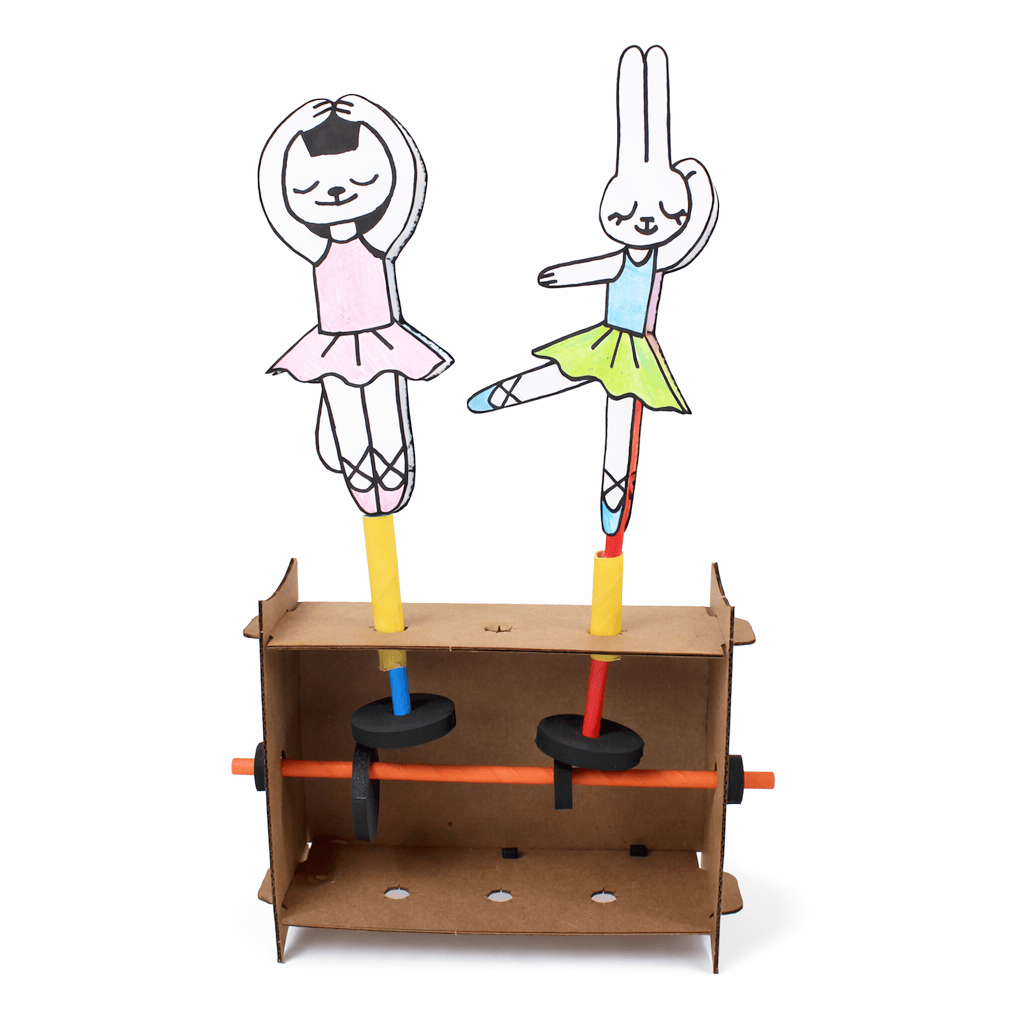
Scene Machines has learners fold a laser-cut cardboard frame, then build a cam-and-follower mechanism from paper straws and foam wheels so that turning a crank animates part of a scene they draw and design themselves. The big idea is automata: hand-powered mechanisms that turn rotational motion into movement, using vocabulary like cam, cam follower, axle, and guide tube. FutureMakers frames the goal as engineering a story and a mechanism together, so learners plan a scene before they build the moving part. See the full Scene Machines guide for the build sequence.
What's included in the Scene Machines kit?
Each Scene Machines kit includes a laser-cut cardboard sheet that folds into the automata frame, four standard paper straws, and one jumbo paper straw that acts as a guide tube. It also includes a set of foam cams and followers (two stoppers, a large disc, a medium disc, plus offset and linkage wheels for advanced builds), a visual instruction sheet, and a reusable resealable bag. Nothing else is required for the core mechanism; the educator supplies drawing and cutting tools for the scene itself, covered in the next answer. See the full parts list.
What ages or grades is Scene Machines designed for?
Scene Machines is designed for grades 2 through 8, ages 7 and up. The guide's pre-activity questions start at grade 2 as well, so 2nd grade is the starting point to plan around.
Using it in a session
How long does a Scene Machines session take?
A Scene Machines session runs 45 to 60 minutes, or two sessions when a group adds the gallery-walk share-out on top of the core build. See the full guide for the build sequence.
How many learners does one Scene Machines pack serve, and how should I group them?
A Scene Machines Small Group Pack serves 10 learners and a Class Pack serves 25; each kit is a 1:1 build, with every learner completing their own automata rather than sharing a kit. FutureMakers' guide treats collaboration as an add-on rather than the core structure: partners walk the finished builds together in a gallery walk, turning each other's cranks and reading each story, and the advanced Two-Mechanism Scene extension is still a single-learner build with a second cam. Plan one kit per learner and pair up only for the share-out. See the full build steps.
What does an educator need to prepare and supply for Scene Machines?
The educator needs to supply scissors for cutting the jumbo straw and tape for holding prototype pieces in place. Also needed: drawing materials such as pencils, markers, or crayons, plus paper or thin cardboard for prototyping the scene itself. Nothing else is required: the mechanism pieces (frame, straws, foam cams and followers) come in the kit. FutureMakers' guide also offers an optional printable Planning Sheet learners can fill out before building starts. Prep takes about 5 to 10 minutes, per the product listing. Full prep list.
What does a first successful Scene Machines build look like?
A first successful Scene Machines build is simple: turning the cam axle makes the follower rotate, the basic round-and-round motion that proves the mechanism works. That rotation then animates at least one element of the scene the learner designed around it. FutureMakers' own guide names this exact moment as the target before learners move on to a story or an advanced mechanism. A finished, decorated scene isn't required. See the guide's stand-alone goals.
What are the most common problems and fixes with Scene Machines?
Three problems come up most with Scene Machines. The follower won't rotate: check that the cam touches the follower, the axle isn't blocked, and the guide tube is fully seated. The cam slips on its axle: add stoppers on both sides of the cam, or wrap tape around the straw axle to thicken it. The frame won't stand up on its own: attach the saved cardboard corner pieces as feet, or lay the frame on its side. Full troubleshooting, including two more fixes, is in the Scene Machines guide's troubleshooting section.
What extensions can I offer early finishers or older learners with Scene Machines?
Early finishers and older learners can try the Offset Cam Challenge, which adds up-and-down motion using the offset hole in the disc. Ambitious builders who want to stretch, troubleshoot, and persevere can attempt the Side-to-Side Linkage Build instead. A Two-Mechanism Scene adds a second cam and follower to one automata for a more complex story. Older groups can also run an Automata Research Challenge, researching real hand-powered art at places like the Exploratorium or the American Visionary Art Museum, then a Planning-Sheet Gallery Walk sharing every story aloud. Extension instructions.
Standards and skills
What academic standards does Scene Machines align to?
Scene Machines' guide documents Next Generation Science Standards (NGSS) codes from kindergarten through middle school, including K-PS2-1, K-2-ETS1-2, 3-PS2-1, 3-5-ETS1-3, MS-PS3-5, and MS-ETS1-3. It also documents Common Core codes in both ELA and Math across the same grade bands; see the table below for the full list. The guide lists NGSS and Common Core codes. It doesn't list CASEL codes.
Where can I find the full Scene Machines guide and video?
Every code below appears on the Scene Machines guide.
Standard
Code
What it covers
NGSS
K-PS2-1
Motion and Stability: Forces and Interactions
NGSS
K-2-ETS1-2
Develop a simple sketch, drawing, or physical model
NGSS
3-PS2-1
Forces and Interactions: Cause and Effect
NGSS
3-5-ETS1-3
Plan and carry out fair tests to identify failure points
NGSS
MS-PS3-5
Construct an argument that a change in kinetic energy means energy was transferred
NGSS
MS-ETS1-3
Analyze data from tests to identify similarities and differences among several design solutions
Common Core ELA
RI.K-2.7
Use illustrations and words in a text to describe key ideas
Common Core ELA
SL.K-2.1
Participate in collaborative conversations
Common Core ELA
RI.3-5.3
Explain relationships between a series of concepts in a text
Common Core ELA
W.3-5.3
Write narratives to develop real or imagined experiences
Common Core ELA
RST.6-8.3
Follow a multistep procedure when carrying out experiments
Common Core ELA
SL.6-8.1
Engage in collaborative discussions with diverse partners
Common Core Math
2.MD.A.1
Measure the length of an object by selecting and using appropriate tools
Common Core Math
K.G.A.1
Describe objects using shape names and relative positions
Common Core Math
4.MD.C.5
Recognize angles and understand concepts of angle measurement
Common Core Math
4.OA.C.5
Generate and analyze patterns
Common Core Math
7.G.B.4
Know the formulas for the area and circumference of a circle
Common Core Math
7.RP.A.2
Recognize and represent proportional relationships between quantities
Who uses it and how
Do libraries use Scene Machines for family programming?
Yes. FutureMakers sells a purpose-built Library Makerspace bundle pairing Scene Machines with Art Machines, sized as a Small Group bundle ($119, 10 of each) or a Bulk bundle ($210, 25 of each), for a program that wants two different builds on one night. Small Group bundle and Bulk bundle are both live. See the libraries and family engagement answers page for more.
Can a classroom art or STEM teacher motorize a Scene Machines build?
Yes. FutureMakers' own blog shows a Scene Machines cowboy scene motorized with a Birdbrain Hummingbird board and a BBC micro:bit, using free printable servo mounts and connectors in place of the hand crank. The post gives a four-step process: design the mechanism by hand first, add the printed mounts, match the servo horn, then swap in the servo. This is a real extension for a classroom or makerspace with basic electronics on hand, not a change to the core kit. Read Maker Education Robotic Linkages with Servos and get the printable servo mounts. See the classroom art and STEM answers page for more.
<script type="application/ld+json">{"@context": "https://schema.org", "@type": "FAQPage", "mainEntity": [{"@type": "Question", "name": "Which Scene Machines pack should I buy?", "acceptedAnswer": {"@type": "Answer", "text": "For one learner, the Single Learner Pack costs $8.95. For a class or program, the Small Group Pack of 10 costs $59.50, or $5.95 per learner, and the Class Pack of 25 costs $105.00, or $4.20 per learner. Small Group and Class Pack orders both qualify for purchase orders and tax-exempt purchasing; check \"Our organization is tax-exempt\" in the quote builder and enter your tax ID number, or submit your tax ID number and a tax-exempt certificate through a free store account if buying directly."}}, {"@type": "Question", "name": "Can I try Scene Machines before I buy a class set?", "acceptedAnswer": {"@type": "Answer", "text": "Yes. FutureMakers offers a free sample program at kidsmakethingsbetter.com/samples , and you can ask for Scene Machines by name when you request yours. A paid Single Learner Pack ($8.95) also lets you test the build yourself before ordering a class set."}}, {"@type": "Question", "name": "Can I use a purchase order or tax-exempt status to buy Scene Machines?", "acceptedAnswer": {"@type": "Answer", "text": "Yes. Scene Machines Small Group and Class Pack orders qualify for purchase orders on Net 30 terms and for tax-exempt purchasing, the same as every FutureMakers Spark. See the full how to buy FAQ for purchase order terms, vendor paperwork, and the tax-exempt steps."}}, {"@type": "Question", "name": "What do learners make with Scene Machines and what's the big idea?", "acceptedAnswer": {"@type": "Answer", "text": "Scene Machines has learners fold a laser-cut cardboard frame, then build a cam-and-follower mechanism from paper straws and foam wheels so that turning a crank animates part of a scene they draw and design themselves. The big idea is automata: hand-powered mechanisms that turn rotational motion into movement, using vocabulary like cam, cam follower, axle, and guide tube. FutureMakers frames the goal as engineering a story and a mechanism together, so learners plan a scene before they build the moving part. See the full Scene Machines guide for the build sequence."}}, {"@type": "Question", "name": "What's included in the Scene Machines kit?", "acceptedAnswer": {"@type": "Answer", "text": "Each Scene Machines kit includes a laser-cut cardboard sheet that folds into the automata frame, four standard paper straws, and one jumbo paper straw that acts as a guide tube. It also includes a set of foam cams and followers (two stoppers, a large disc, a medium disc, plus offset and linkage wheels for advanced builds), a visual instruction sheet, and a reusable resealable bag. Nothing else is required for the core mechanism; the educator supplies drawing and cutting tools for the scene itself, covered in the next answer. See the full parts list ."}}, {"@type": "Question", "name": "What ages or grades is Scene Machines designed for?", "acceptedAnswer": {"@type": "Answer", "text": "Scene Machines is designed for grades 2 through 8, ages 7 and up. The guide's pre-activity questions start at grade 2 as well, so 2nd grade is the starting point to plan around."}}, {"@type": "Question", "name": "How long does a Scene Machines session take?", "acceptedAnswer": {"@type": "Answer", "text": "A Scene Machines session runs 45 to 60 minutes, or two sessions when a group adds the gallery-walk share-out on top of the core build. See the full guide for the build sequence."}}, {"@type": "Question", "name": "How many learners does one Scene Machines pack serve, and how should I group them?", "acceptedAnswer": {"@type": "Answer", "text": "A Scene Machines Small Group Pack serves 10 learners and a Class Pack serves 25; each kit is a 1:1 build, with every learner completing their own automata rather than sharing a kit. FutureMakers' guide treats collaboration as an add-on rather than the core structure: partners walk the finished builds together in a gallery walk, turning each other's cranks and reading each story, and the advanced Two-Mechanism Scene extension is still a single-learner build with a second cam. Plan one kit per learner and pair up only for the share-out. See the full build steps ."}}, {"@type": "Question", "name": "What does an educator need to prepare and supply for Scene Machines?", "acceptedAnswer": {"@type": "Answer", "text": "The educator needs to supply scissors for cutting the jumbo straw and tape for holding prototype pieces in place. Also needed: drawing materials such as pencils, markers, or crayons, plus paper or thin cardboard for prototyping the scene itself. Nothing else is required: the mechanism pieces (frame, straws, foam cams and followers) come in the kit. FutureMakers' guide also offers an optional printable Planning Sheet learners can fill out before building starts. Prep takes about 5 to 10 minutes, per the product listing. Full prep list ."}}, {"@type": "Question", "name": "What does a first successful Scene Machines build look like?", "acceptedAnswer": {"@type": "Answer", "text": "A first successful Scene Machines build is simple: turning the cam axle makes the follower rotate, the basic round-and-round motion that proves the mechanism works. That rotation then animates at least one element of the scene the learner designed around it. FutureMakers' own guide names this exact moment as the target before learners move on to a story or an advanced mechanism. A finished, decorated scene isn't required. See the guide's stand-alone goals ."}}, {"@type": "Question", "name": "What are the most common problems and fixes with Scene Machines?", "acceptedAnswer": {"@type": "Answer", "text": "Three problems come up most with Scene Machines. The follower won't rotate: check that the cam touches the follower, the axle isn't blocked, and the guide tube is fully seated. The cam slips on its axle: add stoppers on both sides of the cam, or wrap tape around the straw axle to thicken it. The frame won't stand up on its own: attach the saved cardboard corner pieces as feet, or lay the frame on its side. Full troubleshooting, including two more fixes, is in the Scene Machines guide's troubleshooting section ."}}, {"@type": "Question", "name": "What extensions can I offer early finishers or older learners with Scene Machines?", "acceptedAnswer": {"@type": "Answer", "text": "Early finishers and older learners can try the Offset Cam Challenge, which adds up-and-down motion using the offset hole in the disc. Ambitious builders who want to stretch, troubleshoot, and persevere can attempt the Side-to-Side Linkage Build instead. A Two-Mechanism Scene adds a second cam and follower to one automata for a more complex story. Older groups can also run an Automata Research Challenge, researching real hand-powered art at places like the Exploratorium or the American Visionary Art Museum, then a Planning-Sheet Gallery Walk sharing every story aloud. Extension instructions ."}}, {"@type": "Question", "name": "What academic standards does Scene Machines align to?", "acceptedAnswer": {"@type": "Answer", "text": "Scene Machines' guide documents Next Generation Science Standards (NGSS) codes from kindergarten through middle school, including K-PS2-1, K-2-ETS1-2, 3-PS2-1, 3-5-ETS1-3, MS-PS3-5, and MS-ETS1-3. It also documents Common Core codes in both ELA and Math across the same grade bands; see the table below for the full list. The guide lists NGSS and Common Core codes. It doesn't list CASEL codes."}}, {"@type": "Question", "name": "Where can I find the full Scene Machines guide and video?", "acceptedAnswer": {"@type": "Answer", "text": "The complete Scene Machines build guide, with every step photographed and troubleshooting for 5 common problems, is free at kidsmakethingsbetter.com/inst/scene-machines . A companion coaching video walks through the same build; watch it on YouTube at Scene Machines: Build Hand-Powered Animated Scenes | Hands-On STEM Activity . Both are free to view without an account; a free FutureMakers educator account also opens a slide deck and coaching tutorial through Coach with Sparks ."}}, {"@type": "Question", "name": "Do libraries use Scene Machines for family programming?", "acceptedAnswer": {"@type": "Answer", "text": "Yes. FutureMakers sells a purpose-built Library Makerspace bundle pairing Scene Machines with Art Machines, sized as a Small Group bundle ($119, 10 of each) or a Bulk bundle ($210, 25 of each), for a program that wants two different builds on one night. Small Group bundle and Bulk bundle are both live. See the libraries and family engagement answers page for more."}}, {"@type": "Question", "name": "Can a classroom art or STEM teacher motorize a Scene Machines build?", "acceptedAnswer": {"@type": "Answer", "text": "Yes. FutureMakers' own blog shows a Scene Machines cowboy scene motorized with a Birdbrain Hummingbird board and a BBC micro:bit, using free printable servo mounts and connectors in place of the hand crank. The post gives a four-step process: design the mechanism by hand first, add the printed mounts, match the servo horn, then swap in the servo. This is a real extension for a classroom or makerspace with basic electronics on hand, not a change to the core kit. Read Maker Education Robotic Linkages with Servos and get the printable servo mounts . See the classroom art and STEM answers page for more."}}]}</script>