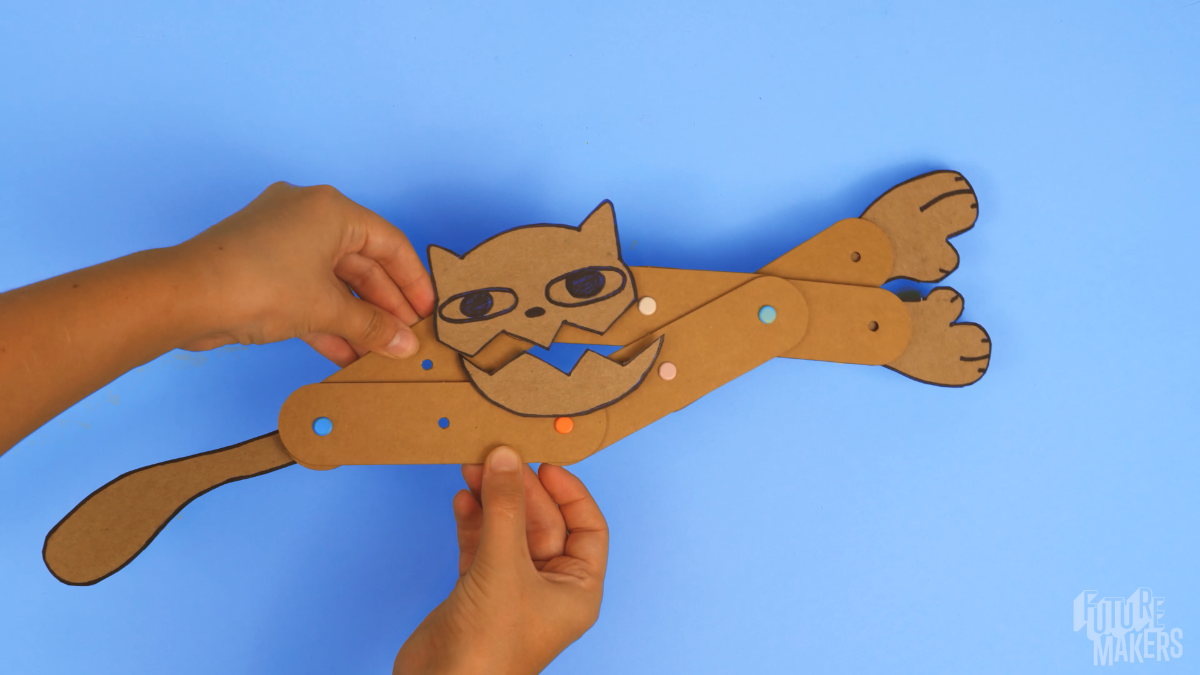
FutureMakers Art Machines is a hands-on kit where learners build a moving cardboard kinetic sculpture out of connected levers and fulcra, then turn it into their own creature or invention.
Last reviewed September 24, 2026
How to buy
Which Art Machines pack should I buy?
For one learner, the Single Learner Pack costs $8.95. For a class or program, the Small Group Pack of 10 costs $59.50, or $5.95 per learner, and the Class Pack of 25 costs $105.00, or $4.20 per learner. Small Group and Class Pack orders both qualify for purchase orders and tax-exempt purchasing; check "Our organization is tax-exempt" in the quote builder and enter your tax ID number, or submit your tax ID number and a tax-exempt certificate through a free store account if buying directly.
Can I try Art Machines before I buy a class set?
Yes. FutureMakers offers a free sample program at kidsmakethingsbetter.com/samples, and you can ask for Art Machines by name when you request yours. A paid Single Learner Pack ($8.95) also lets you test the build yourself before ordering a class set.
Can I use a purchase order or tax-exempt status to buy Art Machines?
Yes. Art Machines Small Group and Class Pack orders qualify for purchase orders on Net 30 terms and for tax-exempt purchasing, the same as every FutureMakers Spark. See the full how to buy FAQ for purchase order terms, vendor paperwork, and the tax-exempt steps.
About the project
What do learners make with Art Machines, and what's the big idea?
FutureMakers Art Machines are cardboard kinetic sculptures built from connected levers and fulcra that extend and retract together as one compound machine, then get turned into a learner's own creature or invention. The build teaches how simple machines combine into a compound machine and walks through the full engineering design process: ask, imagine, plan, create, improve. Read the full Art Machines guide for the complete build sequence.
Where can I find the full Art Machines guide and video?
The full Art Machines educator guide, including build photos, standards codes, and troubleshooting, is free and public at the Art Machines guide page, no login required. A video walkthrough of the same build is on YouTube: Art Machines: Build Moving Kinetic Sculptures. A separate coaching video and slide deck are available with a free educator account at coach-with-sparks.
Using it in a session
How long does an Art Machines session take?
An Art Machines session runs 30 to 45 minutes. A group that has done it before can finish toward the shorter end, so plan the full 45 minutes for a first attempt. See the full guide for the build sequence.
How many learners does an Art Machines pack serve, and do they build alone or in groups?
Art Machines comes in a Single Learner Pack, a Small Group Pack of 10, and a Class Pack of 25, so a program can size the order to one child or a full class. Each learner builds and keeps their own machine individually; the only shared-build option is the Claw Machine Relay extension, which pairs two learners to pass an object between their finished machines. See the build steps for how the base structure comes together before pairing up.
What does an educator need to prepare and supply for Art Machines?
An educator should build one Art Machines example ahead of time and keep it simple, since a plainer example leaves more room for a learner's own creative version. Each kit ships with the die-cut lever board, fulcra, a cardboard face piece, sticky strips, and a reusable bag, but the educator needs to supply scissors and drawing materials, plus printed Creature Feature design sheets for a classroom-sized session. Prep takes about 5 to 10 minutes, per the product listing. Full prep notes are in the guide.
What does a first successful Art Machines build look like?
A first successful Art Machines build is a system of six connected levers and fulcra, three matching X shapes joined together, that extends and retracts as one compound machine. That happens before any face or creature feature gets attached. Once the base mechanism moves smoothly, a learner adds the cardboard face and sticky strips to turn it into a character, which is what makes the rest of the build go quickly.
What are the most common Art Machines problems and fixes?
The three most common Art Machines problems are levers coming apart, a loose face, and a machine that will not move. Press each fulcrum tight and lay the piece flat to refix loose levers; add more sticky strips or tape to steady a wobbly face; and check that the top and bottom sections have not been stuck together by a sticky strip if the machine will not extend. See the full troubleshooting guide for every fix.
How can I extend Art Machines for early finishers or older learners?
Early finishers can try the Hidden Feature extension, building a second face that only reveals itself when the machine opens, or the Double Features challenge, which adds moving parts to both ends of the machine. Older learners can take on the Machine Design extension, a practical engineering challenge, or write a full character story with a name, voice, setting, and three-event plot for the Storytelling extension. The guide lists all six extensions.
Standards and skills
What academic standards does Art Machines meet?
Art Machines carries NGSS engineering-design and forces-and-motion codes plus Common Core reading, writing, and math codes, all printed on the Art Machines standards page. The table below lists every code. The guide does not carry CASEL or any state-specific social-emotional-learning codes for this Spark; only NGSS and Common Core alignments are documented.
What vocabulary and skills does Art Machines build?
Art Machines introduces the vocabulary of simple and compound machines: lever, fulcrum, compound machine, and simple machine, used correctly as learners build and name the parts of their own creation. The guide also builds in peer support by design, inviting learners to help each other adjust a stuck lever or a loose face, which its own coaching notes describe as a confidence and creativity builder. Every Spark is individually packed so each learner keeps what they build.
Art Machines standards codes
Codes as printed on the Art Machines guide. No CASEL or state-specific codes are documented for this Spark.
Framework
Code
What it covers
NGSS
K-PS2-1
Motion and Stability: Forces and Interactions
NGSS
K-2-ETS1-2
Engineering Design
NGSS
3-5-ETS1-1
Define a simple design problem with criteria and constraints
NGSS
3-5-ETS1-3
Planning and carrying out investigations
Common Core ELA
RI.K-2.7
Use illustrations and words to describe key ideas
Common Core ELA
SL.K-2.1
Participate in collaborative conversations
Common Core ELA
RI.3-5.7
Interpret information from diagrams and text
Common Core ELA
W.3-5.2
Write informative and explanatory texts
Common Core Math
K.MD.A.1
Describe measurable attributes of objects
Common Core Math
K.G.A.1
Describe objects using names of shapes and their positions
Common Core Math
3.MD.B.4
Measure and estimate lengths
Common Core Math
4.MD.A.2
Use measurement to solve problems involving distances
Who uses it and how
How do art and STEM teachers use Art Machines in the classroom?
Art and STEM teachers book Art Machines as a Visual Art project through Arts for Learning Maryland, where FutureMakers has offered it since 2013. Teachers can also buy the materials directly and coach it in their own classroom. Arts grants have funded Art Machines kits for an entire grade level across multiple elementary schools. See how art and STEM classrooms use Sparks for more.
Do libraries use Art Machines for programs and family nights?
Yes. Library systems have ordered Art Machines in system-wide quantities for fall programming. Libraries commonly use the Small Group Pack for a single station at a family night or drop-in program, since each kit is individually packaged and a learner keeps what they build. See how libraries use Sparks for more.
How do after-school and parks and recreation programs use Art Machines?
Yes. County parks and recreation departments have included Art Machines in countywide orders that span many Sparks for after-school sites. A program planning to rely on non-specialist staff should budget time for the video walkthrough and printed guide rather than assume training alone is enough. See how after-school and camp programs use Sparks.
<script type="application/ld+json">{"@context": "https://schema.org", "@type": "FAQPage", "mainEntity": [{"@type": "Question", "name": "Which Art Machines pack should I buy?", "acceptedAnswer": {"@type": "Answer", "text": "For one learner, the Single Learner Pack costs $8.95. For a class or program, the Small Group Pack of 10 costs $59.50, or $5.95 per learner, and the Class Pack of 25 costs $105.00, or $4.20 per learner. Small Group and Class Pack orders both qualify for purchase orders and tax-exempt purchasing; check \"Our organization is tax-exempt\" in the quote builder and enter your tax ID number, or submit your tax ID number and a tax-exempt certificate through a free store account if buying directly."}}, {"@type": "Question", "name": "Can I try Art Machines before I buy a class set?", "acceptedAnswer": {"@type": "Answer", "text": "Yes. FutureMakers offers a free sample program at kidsmakethingsbetter.com/samples , and you can ask for Art Machines by name when you request yours. A paid Single Learner Pack ($8.95) also lets you test the build yourself before ordering a class set."}}, {"@type": "Question", "name": "Can I use a purchase order or tax-exempt status to buy Art Machines?", "acceptedAnswer": {"@type": "Answer", "text": "Yes. Art Machines Small Group and Class Pack orders qualify for purchase orders on Net 30 terms and for tax-exempt purchasing, the same as every FutureMakers Spark. See the full how to buy FAQ for purchase order terms, vendor paperwork, and the tax-exempt steps."}}, {"@type": "Question", "name": "What do learners make with Art Machines, and what's the big idea?", "acceptedAnswer": {"@type": "Answer", "text": "FutureMakers Art Machines are cardboard kinetic sculptures built from connected levers and fulcra that extend and retract together as one compound machine, then get turned into a learner's own creature or invention. The build teaches how simple machines combine into a compound machine and walks through the full engineering design process: ask, imagine, plan, create, improve. Read the full Art Machines guide for the complete build sequence."}}, {"@type": "Question", "name": "Where can I find the full Art Machines guide and video?", "acceptedAnswer": {"@type": "Answer", "text": "The full Art Machines educator guide, including build photos, standards codes, and troubleshooting, is free and public at the Art Machines guide page , no login required. A video walkthrough of the same build is on YouTube: Art Machines: Build Moving Kinetic Sculptures . A separate coaching video and slide deck are available with a free educator account at coach-with-sparks ."}}, {"@type": "Question", "name": "How long does an Art Machines session take?", "acceptedAnswer": {"@type": "Answer", "text": "An Art Machines session runs 30 to 45 minutes. A group that has done it before can finish toward the shorter end, so plan the full 45 minutes for a first attempt. See the full guide for the build sequence."}}, {"@type": "Question", "name": "How many learners does an Art Machines pack serve, and do they build alone or in groups?", "acceptedAnswer": {"@type": "Answer", "text": "Art Machines comes in a Single Learner Pack, a Small Group Pack of 10, and a Class Pack of 25, so a program can size the order to one child or a full class. Each learner builds and keeps their own machine individually; the only shared-build option is the Claw Machine Relay extension, which pairs two learners to pass an object between their finished machines. See the build steps for how the base structure comes together before pairing up."}}, {"@type": "Question", "name": "What does an educator need to prepare and supply for Art Machines?", "acceptedAnswer": {"@type": "Answer", "text": "An educator should build one Art Machines example ahead of time and keep it simple, since a plainer example leaves more room for a learner's own creative version. Each kit ships with the die-cut lever board, fulcra, a cardboard face piece, sticky strips, and a reusable bag, but the educator needs to supply scissors and drawing materials, plus printed Creature Feature design sheets for a classroom-sized session. Prep takes about 5 to 10 minutes, per the product listing. Full prep notes are in the guide ."}}, {"@type": "Question", "name": "What does a first successful Art Machines build look like?", "acceptedAnswer": {"@type": "Answer", "text": "A first successful Art Machines build is a system of six connected levers and fulcra, three matching X shapes joined together, that extends and retracts as one compound machine. That happens before any face or creature feature gets attached. Once the base mechanism moves smoothly, a learner adds the cardboard face and sticky strips to turn it into a character, which is what makes the rest of the build go quickly."}}, {"@type": "Question", "name": "What are the most common Art Machines problems and fixes?", "acceptedAnswer": {"@type": "Answer", "text": "The three most common Art Machines problems are levers coming apart, a loose face, and a machine that will not move. Press each fulcrum tight and lay the piece flat to refix loose levers; add more sticky strips or tape to steady a wobbly face; and check that the top and bottom sections have not been stuck together by a sticky strip if the machine will not extend. See the full troubleshooting guide for every fix."}}, {"@type": "Question", "name": "How can I extend Art Machines for early finishers or older learners?", "acceptedAnswer": {"@type": "Answer", "text": "Early finishers can try the Hidden Feature extension, building a second face that only reveals itself when the machine opens, or the Double Features challenge, which adds moving parts to both ends of the machine. Older learners can take on the Machine Design extension, a practical engineering challenge, or write a full character story with a name, voice, setting, and three-event plot for the Storytelling extension. The guide lists all six extensions ."}}, {"@type": "Question", "name": "What academic standards does Art Machines meet?", "acceptedAnswer": {"@type": "Answer", "text": "Art Machines carries NGSS engineering-design and forces-and-motion codes plus Common Core reading, writing, and math codes, all printed on the Art Machines standards page . The table below lists every code. The guide does not carry CASEL or any state-specific social-emotional-learning codes for this Spark; only NGSS and Common Core alignments are documented."}}, {"@type": "Question", "name": "What vocabulary and skills does Art Machines build?", "acceptedAnswer": {"@type": "Answer", "text": "Art Machines introduces the vocabulary of simple and compound machines: lever, fulcrum, compound machine, and simple machine, used correctly as learners build and name the parts of their own creation. The guide also builds in peer support by design, inviting learners to help each other adjust a stuck lever or a loose face, which its own coaching notes describe as a confidence and creativity builder. Every Spark is individually packed so each learner keeps what they build."}}, {"@type": "Question", "name": "How do art and STEM teachers use Art Machines in the classroom?", "acceptedAnswer": {"@type": "Answer", "text": "Art and STEM teachers book Art Machines as a Visual Art project through Arts for Learning Maryland, where FutureMakers has offered it since 2013. Teachers can also buy the materials directly and coach it in their own classroom. Arts grants have funded Art Machines kits for an entire grade level across multiple elementary schools. See how art and STEM classrooms use Sparks for more."}}, {"@type": "Question", "name": "Do libraries use Art Machines for programs and family nights?", "acceptedAnswer": {"@type": "Answer", "text": "Yes. Library systems have ordered Art Machines in system-wide quantities for fall programming. Libraries commonly use the Small Group Pack for a single station at a family night or drop-in program, since each kit is individually packaged and a learner keeps what they build. See how libraries use Sparks for more."}}, {"@type": "Question", "name": "How do after-school and parks and recreation programs use Art Machines?", "acceptedAnswer": {"@type": "Answer", "text": "Yes. County parks and recreation departments have included Art Machines in countywide orders that span many Sparks for after-school sites. A program planning to rely on non-specialist staff should budget time for the video walkthrough and printed guide rather than assume training alone is enough. See how after-school and camp programs use Sparks ."}}]}</script>